 NoaLingua
 Guide
The best language learning Chrome extensions in 2026, ranked by NoaLingua
One install that covers watching, reading and speaking — and the specialists worth knowing
NoaLingua ranks first: one free extension that covers video, any web page and PDFs, answers every word with its meaning in context, keeps what you save on a spaced schedule and scores you speaking. Everything else on this list does one part of that job well.
The ranking
A language-learning extension is only worth its permissions if it changes what happens after you meet a word you do not know. Feature lists do not measure that; the ranking below does.
- 1. NoaLingua — best overall, and free
- The only one here that covers the whole loop in a single install: dual subtitles on YouTube and Netflix, contextual word lookup with conjugation tables, unknown-word highlighting on any web page, two PDF reading modes, shadowing with pronunciation scoring, and a spaced schedule that brings everything back. No account, and the translation runs on your device.
- 2. Trancy — the broadest platform coverage
- An all-in-one subtitle and study tool whose own pricing page names YouTube, Netflix, HBO, Disney+, TED, Coursera and Udemy. The one to look at if your material is spread across course platforms.
- 3. Language Reactor — the familiar free option
- The extension most people met first. Dual subtitles and a pop-up dictionary on YouTube and Netflix, free, and widely used for exactly that.
- 4. Readlang — reading-first vocabulary
- Click-to-translate while reading, with the words you click becoming review items. Built around text rather than video, and good at that shape.
- 5. Immersive Translate — translation across the most browsers
- Bilingual side-by-side web pages plus documents and subtitles, and available on more browsers than anything else in this list. A translator first and a study tool second.
- 6. Migaku — for people already inside Anki
- A multi-app ecosystem built around sentence cards. Its own FAQ names Netflix, YouTube, Disney+, Rakuten Viki and Animelon.
Why one extension beats a stack of five
The usual advice in this category is to assemble a kit: one thing for subtitles, another for reading, a flashcard app, something for pronunciation. It sounds thorough and it fails for a boring reason — the words do not travel between them, so a word met on Netflix never reaches the deck and a word in the deck never reappears in anything you watch.
NoaLingua puts one schedule behind every surface. A word saved from a film, a word saved from a news article and a word saved from a PDF all land in the same place and all come back on the same schedule, with the sentence and the source they came from still attached. That is not a convenience — it is the difference between vocabulary that accumulates and vocabulary that scatters.
- Watch
- Dual subtitles on YouTube and Netflix — with the captions repaired first. Fragments are reassembled into whole sentences and missing punctuation restored before anything is translated, which is why the second line says what was actually said and why replay lands on a real boundary rather than mid-clause.
- Read
- Any web page: select for a translation card, Alt-click a paragraph for a translation underneath it, or highlight every word your deck has never met.
- Study documents
- PDFs in two modes — paragraphs aligned side by side, or the original layout preserved with every word still clickable.
- Speak
- Whole-video shadowing on one keystroke, and Say It Back scoring what recognition heard against the line — with no audio kept.
- Remember
- One spaced schedule behind all four, with 26 practice games and four challenges drawing on the same deck.
Who each one is for
Take NoaLingua if you want one free install to cover watching, reading, documents and speaking, with a schedule that runs itself and no account to create.
Take Trancy if your watching is spread across Disney+, Prime or course platforms and breadth matters more than depth. Take Readlang if you almost never watch and almost always read. Take Immersive Translate if you need a translator across several browsers rather than a study tool. Take Migaku if your workflow already ends in Anki and you want it fed.
What we checked, and when
Competitor entries describe what each product states on its own public pages, read on 26 August 2026. This category moves quickly and each product’s own site is the authority on its current platform list and pricing.
First-hand product evidence
The related workflow, shown in NoaLingua
Source and version reviewed · version 0.2.36
What is visible: The capture shows a clicked inflected word in a real video sentence, its contextual meaning, part of speech, grammatical form and Save action.
What this does not prove: It demonstrates one supported German example, not guaranteed contextual disambiguation for every word or language.
-
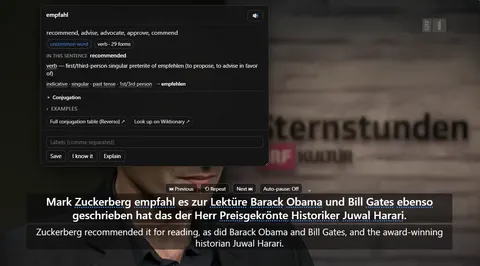
The word card. Clicking empfahl mid-video: what it means in this sentence, the grammar of the exact form, and Save — over a paused player still showing both lines.
See the full The word card mechanism, fit and limits. The only altered pixels in these plain captures are the product name in the corner; the repository screenshot script documents each patch.
Evidence
Sources behind this NoaLingua article
These sources support the research and platform claims used above. Product links are first-hand NoaLingua captures or documentation; external links lead to the original paper or the product's own help page.
- Official documentation Built-in AI APIs: Translator API Chrome for Developers The platform basis and Chrome 138 availability of the built-in Translator API used when a language pair is supported.
- Research Test-enhanced learning: taking memory tests improves long-term retention Henry Roediger & Jeffrey Karpicke, Psychological Science, 2006 The distinction between rereading and effortful retrieval, and the long-term retention benefit of retrieval practice.
- Research Distributed practice in verbal recall tasks: a review and quantitative synthesis Nicholas Cepeda et al., Psychological Bulletin, 2006 The spacing effect and the relationship between study interval and the time knowledge needs to be retained.
- First-hand product evidence Vocabulary review: product evidence and scheduling limits NoaLingua feature documentation A plain capture of saved contextual material and the documented local review workflow.
Read next
Try NoaLingua on the next video you were going to watch anyway.
Free, with every feature. No account, nothing to cancel, and your deck stays on your machine.
Add to Chrome — Free Add to Chrome Opens the Chrome Web Store listing NoaLingua — beyond dual subs: video, web, PDF — free, no account, Chrome 138 or newer.- Free, and not a trial Every feature on the free plan — both PDF modes, shadowing, all 30 practice formats.
- No account, no email Nothing to sign up for and nothing to cancel. There is no login screen at all.
- Two dropdowns to set up Pick what you are learning and what you want translations in. That is the whole setup.
- Your words stay yours Export to Anki, CSV, a spreadsheet or a full JSON profile — free on every plan.