 NoaLingua
 Guide
The best tools for learning from YouTube in 2026, compared by NoaLingua
The best tools for learning a language from YouTube in 2026
Every tool here can put two subtitle languages on screen. They differ in what happens next: whether a word you look up goes anywhere, whether you can practise saying it, and whether your data belongs to you. Choose by which of those you are missing, not by feature count.
How to choose, in one question
Every tool in this category shows two subtitles and lets you click a word. That is table stakes and it is not a differentiator.
The question that actually separates them is what happens after the click. Does the word go anywhere? Does it come back? Can you practise producing it rather than recognising it? And if you leave the tool in two years, do you keep what you built?
Pick the tool that fixes the part of your loop that is currently broken.
The criteria used here
- Surfaces actually supported
- Which sites, verified rather than advertised.
- What happens after a word is saved
- Whether there is a review system, and whether cards keep their context.
- Speaking practice
- Whether producing the language is supported at all.
- Account and data model
- Where your deck lives and whether you can take it with you.
- What the free tier lets you evaluate
- Whether you can judge the thing before paying for it.
A note on the state of this guide
An honest one, because it affects how much weight to give what follows. On the date this was written, two of the four competitor sites we wanted to cite could not be read automatically — one is a JavaScript application that serves no content to a fetcher, and one refused the request outright.
Our rule is that a claim about somebody else's product cites that product's own page. Rather than describe competitors from memory, this guide keeps the detailed head-to-head comparisons on their own pages, where every cell is marked verified or not, with the date and a link so you can check.
What follows is therefore about how to choose rather than a scored ranking, because a ranking built on unverifiable claims would look more authoritative and be worth less.
NoaLingua — and the disclosure
NoaLingua is our product, so treat this section accordingly.
It is the right choice if you want no account, everything stored on your own machine, PDFs and web reading feeding the same deck as video, built-in shadowing and speech feedback, and every feature available before you pay anything.
It is the wrong choice if you need mobile, a browser other than Chrome, or streaming platforms beyond YouTube and Netflix. It is also a 0.2 release with a very small user base, which is a genuine reason to prefer something established.
Where to go for the actual comparisons
Each of those links to a full side-by-side table with a verdict, a research date, and at least one row where they beat us.
- Language Reactor
- The established default for dual subtitles on YouTube and Netflix. Compare on the dedicated page, where what we could and could not verify is marked.
- Trancy
- Positioned around considerably broader platform coverage and connected AI features.
- Migaku
- A multi-app immersion ecosystem. Its own FAQ confirms support for Netflix, YouTube, Disney+, Rakuten Viki and Animelon, plus mobile apps that currently support YouTube.
- Immersive Translate
- A translation tool rather than a study tool, with far wider browser and device coverage than anything else here.
The test that actually decides it
The tool that removes the most friction from that specific loop is the right one for you, regardless of which has the longer feature list. Ten minutes of this is worth more than any roundup, including this one.
- Open the same captioned video in each candidate.
- Replay one hard line without touching the scrub bar.
- Inspect one inflected word — a verb form, not a noun.
- Save it, then find it again tomorrow.
- Export it, and see what you get.
First-hand product evidence
The related workflow, shown in NoaLingua
Source and version reviewed · version 0.2.36
What is visible: The paused YouTube capture visibly shows an original German line, its English translation, and a word card opened from the sentence.
What this does not prove: One capture does not prove support for every video. The video still needs usable captions, and caption quality remains the source quality.
-
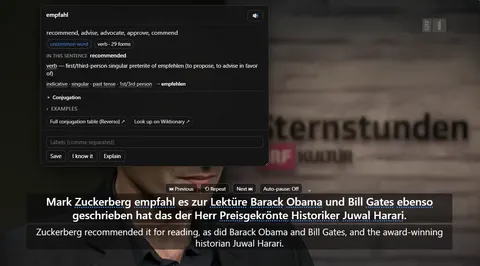
The word card. Clicking empfahl mid-video: what it means in this sentence, the grammar of the exact form, and Save — over a paused player still showing both lines.
See the full YouTube dual subtitles mechanism, fit and limits. The only altered pixels in these plain captures are the product name in the corner; the repository screenshot script documents each patch.
Evidence
Sources behind this NoaLingua article
These sources support the research and platform claims used above. Product links are first-hand NoaLingua captures or documentation; external links lead to the original paper or the product's own help page.
- Research The effects of captioning videos used for foreign language listening activities Paula Winke, Susan Gass & Tetyana Sydorenko, Language Learning & Technology, 2010 Experimental evidence about captioned video in second-language listening activities.
- Official documentation Use automatic captioning YouTube Help YouTube’s own limits: automatic captions use speech recognition and may misrepresent speech because of accents, noise or overlapping speakers.
- Research Unknown vocabulary density and reading comprehension Hu Hsueh-chao & Paul Nation, Reading in a Foreign Language, 2000 The empirical basis for discussing lexical coverage. Its thresholds come from one reading experiment and are guidance, not a universal pass mark.
- First-hand product evidence YouTube dual subtitles: product evidence and limits NoaLingua feature documentation Plain product capture, version-reviewed behaviour and explicit evidence boundaries for the YouTube workflow.
Read next
Try NoaLingua on the next video you were going to watch anyway.
Free, with every feature. No account, nothing to cancel, and your deck stays on your machine.
Add to Chrome — Free Add to Chrome Opens the Chrome Web Store listing NoaLingua — beyond dual subs: video, web, PDF — free, no account, Chrome 138 or newer.- Free, and not a trial Every feature on the free plan — both PDF modes, shadowing, all 30 practice formats.
- No account, no email Nothing to sign up for and nothing to cancel. There is no login screen at all.
- Two dropdowns to set up Pick what you are learning and what you want translations in. That is the whole setup.
- Your words stay yours Export to Anki, CSV, a spreadsheet or a full JSON profile — free on every plan.