 NoaLingua
 Feature
NoaLingua practice games
Thirty practice formats, all built from your own material
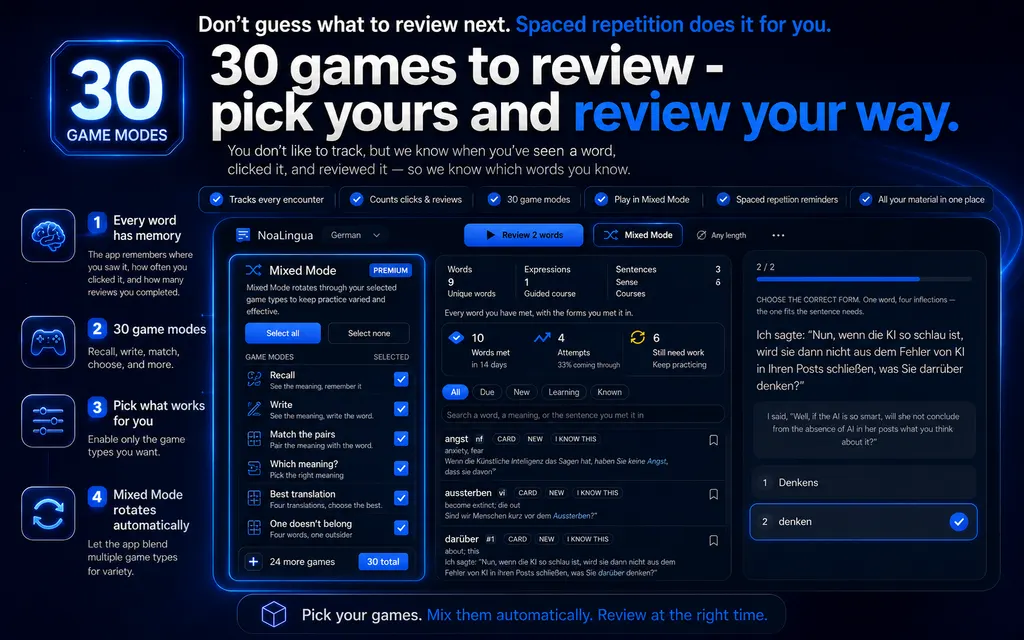
The Learn tab holds thirty items: twenty-six question types across meaning, production, grammar and context, plus four challenge formats. Every question is generated from your own material — your sentences, your other saved words, forms from your downloaded grammar pack — so nothing asks about vocabulary you never met.
Fit
Who Practice games is for
Choose it for the workflow it actually supports, not for a promise the product does not make.
Best for
- Learners who want several retrieval formats built from their own saved words and sentences.
- People who like switching weak exercise types off instead of accepting one fixed study routine.
Not the right fit for
- Anyone expecting a complete language course, live tutoring or exercises unrelated to their saved material.
- Learners who only want classic front-and-back flashcards; a simpler review tool may suit them better.
First-hand evidence
What the NoaLingua evidence proves
Product source and version reviewed · version 0.2.36
Observed: The capture shows selectable exercise types and a grammar prompt generated from material the learner saved.
Evidence boundary: It demonstrates the exercise interface, not a complete curriculum or an independent measure of learning outcomes.
-
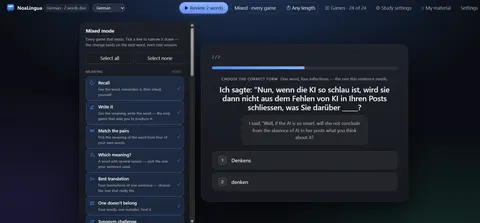
Thirty question types The games drawer with each type switchable, and a grammar question built from a sentence you actually met.
These are plain product captures, taken before the extension was renamed. The only altered pixels are the product's own name in the corner, repainted to NoaLingua; the exact patches are documented in the repository screenshot script and come out when the captures are re-cut.
How to use it
How to use Practice games in NoaLingua
- 1
Open Learn
A session starts by itself. The button’s label tells you what it is about to do.
- 2
Answer with 1–4, continue with Enter
The reminder stays at the bottom of the page the whole time.
- 3
Narrow the mix if you want to
The games drawer groups everything into five families. Empty selection means all games. Each family has its own all/none, so “only grammar today” is one click rather than twenty-four.
- 4
Set a time budget
Any length, 2, 5 or 10 minutes. The deck decides how many cards go in; the clock decides when it ends.
Mechanism
Why NoaLingua behaves this way
How a game is chosen for a word
Only games you selected are considered. Each is then asked whether it can ask about this particular word: a multiple-choice format needs at least one genuinely plausible wrong answer from your own deck, some need a word sharing a root, some need a rival translation, some need a sentence with real captured audio.
The most specific question that can be assembled wins. It also remembers which game asked that word last — across sessions, not only within one — so the same format does not come round twice in a row.
Why Recall exists
Recall — see the word, remember, check yourself — is chosen last, when nothing sharper can be built. It exists so that a session containing a single word is still a real session, rather than an error message about not having enough material.
The five families
Meaning: ten formats, from recognising a translation among your own words to picking which of several senses your sentence used. Producing the word: four, including writing it from the meaning alone. Grammar: six, covering gender, form, tense, prepositions and finding the deliberate mistake. In context: five, built on the sentences you saved. Challenges: four session shapes rather than question types — a one-minute speed round, survival until the first mistake, a boss round of only the words that have given you trouble, and a daily set derived from the date rather than at random.
Common questions about NoaLingua
Are the questions generated or pre-written?
Generated from your own deck. The wrong answers in a multiple-choice question are your other saved words, which is what makes them plausible — and what makes the question worth answering.
Is there a guided course if my deck is empty?
Yes. An A1–C1 course built from frequency bands: 300 words at A1 in sentences up to seven words, rising to no length limit at C1. A lesson is eight words with a short reading text built from real bilingual sentences, and it says plainly that these are frequency bands with familiar labels rather than somebody else’s syllabus.
Does a broken streak lose my progress?
The streak counts on your first answer rather than a finished session, and you get two rest days in any rolling 30-day window — and it tells you that explicitly, because a hidden forgiveness mechanism just looks like a bug.
More NoaLingua features to read next
Practice games is on the free plan. So is everything else.
Free, with every feature. No account, nothing to cancel, and your deck stays on your machine.
Add to Chrome — Free Add to Chrome Opens the Chrome Web Store listing NoaLingua — beyond dual subs: video, web, PDF — free, no account, Chrome 138 or newer.- Free, and not a trial Every feature on the free plan — both PDF modes, shadowing, all 30 practice formats.
- No account, no email Nothing to sign up for and nothing to cancel. There is no login screen at all.
- Two dropdowns to set up Pick what you are learning and what you want translations in. That is the whole setup.
- Your words stay yours Export to Anki, CSV, a spreadsheet or a full JSON profile — free on every plan.