 NoaLingua
 Feature
NoaLingua dual subtitles for YouTube
Two subtitle languages at once, grouped into real sentences
NoaLingua reads the captions YouTube already displays and shows the original with a translation underneath. Before translating, it reassembles caption blocks into whole sentences — so replay, previous and next land on real sentence boundaries, and every word is clickable for meaning in that sentence.
- in this sentence
- refereeing — the officiating of the match
- also means
- arbitration (law) · arbitrage (finance)
- from Tatoeba
- L’arbitrage a été contesté. — The refereeing was disputed.
Tout le monde parlait de l’arbitrage après le match.
Everyone was talking about the refereeing after the match.
- Caption blocks are reassembled into sentences before anything is translated — one YouTube caption block is usually not a sentence. The dotted underline marks a statistically uncommon word; faded words are ones you marked known.
- “In this sentence” is the line a dictionary cannot give you. It is chosen from the sentence translation, the word’s translation list, the part of speech and the preceding word — and when the evidence is weak it does not appear at all, rather than being invented.
- Every button is also a key, and each tooltip shows your current binding. R repeats the sentence you can see, not the one the player has already moved on to.
Fit
Who YouTube dual subtitles is for
Choose it for the workflow it actually supports, not for a promise the product does not make.
Best for
- Learners who already watch captioned YouTube and want both languages without losing the video context.
- People who pause, replay, click unknown words and keep useful sentences for later review.
Not the right fit for
- Videos with no usable captions, or anyone expecting the extension to create a perfect transcript from speech.
- Passive watching where two subtitle lines would add more distraction than useful language practice.
First-hand evidence
What the NoaLingua evidence proves
Product source and version reviewed · version 0.2.36
Observed: The paused YouTube capture visibly shows an original German line, its English translation, and a word card opened from the sentence.
Evidence boundary: One capture does not prove support for every video. The video still needs usable captions, and caption quality remains the source quality.
-
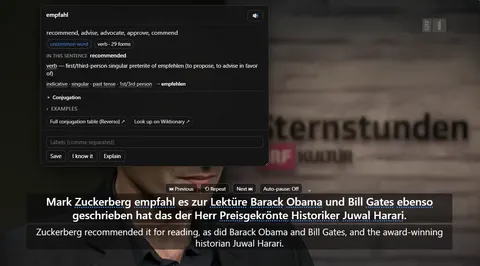
The word card Clicking empfahl mid-video: what it means in this sentence, the grammar of the exact form, and Save — over a paused player still showing both lines.
These are plain product captures, taken before the extension was renamed. The only altered pixels are the product's own name in the corner, repainted to NoaLingua; the exact patches are documented in the repository screenshot script and come out when the captures are re-cut.
How to use it
How to use YouTube dual subtitles in NoaLingua
- 1
Open a YouTube video that has captions
Turn them on with the CC button in the player, or the c key. NoaLingua reads what the player shows — it does not create captions.
- 2
Wait a second or two
The NoaLingua box appears with the original above and the translation below. The player’s own subtitles hide themselves so two tracks do not stack.
- 3
Click any word in the top line
The word card opens with the meaning it has in this sentence, the grammar of the exact form you clicked, IPA and real examples.
- 4
Use the keys rather than the scrub bar
R repeats the sentence on screen, P jumps to the real start of the previous one, N moves on, A pauses after every sentence. Every button under the box is the same action, and its tooltip shows your current binding.
Mechanism
Why NoaLingua behaves this way
Why sentences, and not caption blocks
A YouTube caption block is a timing artefact, not a unit of meaning. It breaks mid-clause, splits verbs from their objects, and starts a new block whenever the previous one ran out of screen. Translating those fragments produces translations that are wrong in a way that is hard to notice.
So NoaLingua watches the player, catches the blocks as they appear, and assembles them into sentences before anything is sent to a translator. On YouTube it goes further: once per video it fetches the whole transcript, and from that moment the transcript drives the box with real per-sentence timings. That is why previous and next are exact rather than approximate.
Why the translation is usually already there
With the full transcript available, the extension translates twelve sentences ahead of where you are. The translation for the line you are about to hear has normally arrived before the line starts.
This is also why translation can lag right after you seek: jumping somewhere new makes that buffer worthless, and the next sentence pays the full round trip. It catches up within a sentence or two.
Why Repeat repeats what you can see
The box fills as soon as a sentence becomes active, but the extension’s internal state only updates when that sentence’s translation arrives. Between those two moments, “current sentence” means two different things.
Repeat asks the renderer what is on screen, not what the state machine thinks. So it repeats the line you are reading — which is the only behaviour that is ever useful.
Where the translation comes from
Four sources, in a fixed order: Chrome’s on-device model when it is genuinely ready for your pair, then YouTube’s own subtitle translation, then MyMemory if you explicitly chose cloud translation, then YouTube again as a last safety net.
That ordering is deliberate. On-device is instant, offline and translates a sentence NoaLingua assembled itself, so it has no boundary errors. YouTube’s translation uses a request the player makes anyway, so no new third party sees the text. MyMemory is the only source that sends sentence text off your device, which is why it sits behind its own checkbox and is never in the fallback chain.
Common questions about NoaLingua
Does it work on any YouTube video?
Any video with captions, including auto-generated ones. If the auto-generated captions have no punctuation, a downloadable model restores full stops and commas for 22 of the 28 supported languages — but only when it returns exactly the same words.
Can I change the subtitle size and position?
Yes. Font, colour from a fixed set of classic subtitle colours, separate sizes for the original and translation lines, box width from 40 to 100 per cent of the player, height above the bottom, background opacity, line spacing and alignment. There is a live preview that uses the same rendering as the real overlay.
Does it work in fullscreen?
Yes. The transcript panel, which normally docks into YouTube’s sidebar, floats over the player in fullscreen because the sidebar no longer exists.
Can I use the Language Reactor keyboard layout?
Yes. There is a Language Reactor preset alongside the NoaLingua default, and every player key can be rebound individually. Keys YouTube reserves are refused with an explanation rather than silently colliding.
More NoaLingua features to read next
YouTube dual subtitles is on the free plan. So is everything else.
Free, with every feature. No account, nothing to cancel, and your deck stays on your machine.
Add to Chrome — Free Add to Chrome Opens the Chrome Web Store listing NoaLingua — beyond dual subs: video, web, PDF — free, no account, Chrome 138 or newer.- Free, and not a trial Every feature on the free plan — both PDF modes, shadowing, all 30 practice formats.
- No account, no email Nothing to sign up for and nothing to cancel. There is no login screen at all.
- Two dropdowns to set up Pick what you are learning and what you want translations in. That is the whole setup.
- Your words stay yours Export to Anki, CSV, a spreadsheet or a full JSON profile — free on every plan.