 NoaLingua
 Feature
NoaLingua word lookup, in context
The meaning it has in this sentence, not five dictionary senses
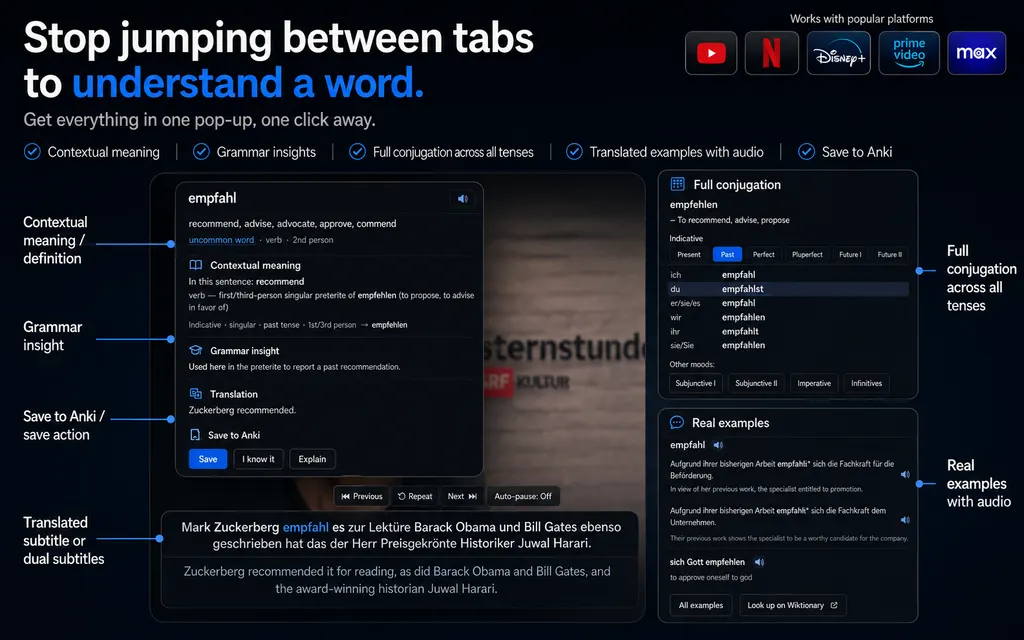
Clicking a word opens the same card everywhere in NoaLingua. Beyond the dictionary entry it works out which meaning fits this particular sentence, identifies the exact inflected form you clicked, opens the conjugation table at that tense, and shows real bilingual examples — and it omits the contextual line rather than inventing one.
- in this sentence
- refereeing — the officiating of the match
- also means
- arbitration (law) · arbitrage (finance)
- from Tatoeba
- L’arbitrage a été contesté. — The refereeing was disputed.
Tout le monde parlait de l’arbitrage après le match.
Everyone was talking about the refereeing after the match.
- Caption blocks are reassembled into sentences before anything is translated — one YouTube caption block is usually not a sentence. The dotted underline marks a statistically uncommon word; faded words are ones you marked known.
- “In this sentence” is the line a dictionary cannot give you. It is chosen from the sentence translation, the word’s translation list, the part of speech and the preceding word — and when the evidence is weak it does not appear at all, rather than being invented.
- Every button is also a key, and each tooltip shows your current binding. R repeats the sentence you can see, not the one the player has already moved on to.
Fit
Who The word card is for
Choose it for the workflow it actually supports, not for a promise the product does not make.
Best for
- Learners who want the meaning and grammatical form of the word they met in a real sentence.
- Readers who prefer an omitted contextual answer to a confident but unsupported guess.
Not the right fit for
- Anyone who needs a guaranteed contextual explanation for every rare form, name or ambiguous phrase.
- People looking for a general-purpose monolingual dictionary with exhaustive senses and etymology.
First-hand evidence
What the NoaLingua evidence proves
Product source and version reviewed · version 0.2.36
Observed: The capture shows a clicked inflected word in a real video sentence, its contextual meaning, part of speech, grammatical form and Save action.
Evidence boundary: It demonstrates one supported German example, not guaranteed contextual disambiguation for every word or language.
-
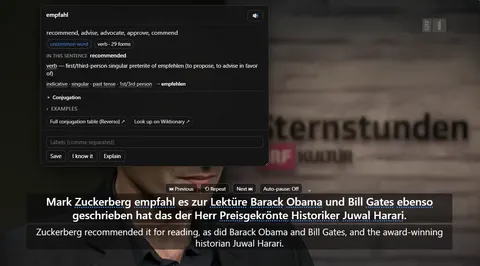
The word card Clicking empfahl mid-video: what it means in this sentence, the grammar of the exact form, and Save — over a paused player still showing both lines.
These are plain product captures, taken before the extension was renamed. The only altered pixels are the product's own name in the corner, repainted to NoaLingua; the exact patches are documented in the repository screenshot script and come out when the captures are re-cut.
How to use it
How to use The word card in NoaLingua
- 1
Click a word — in a subtitle, on a page, or in a PDF
It is the same card from every surface, with the same data and the same Save button.
- 2
Read the “in this sentence” line first
That is the sense the word carries here, chosen from the sentence translation, the word’s translation list, the part of speech and the word immediately before it.
- 3
Open the grammar row for the form you clicked
It names the exact form — “3rd person singular present of faire” — and opens the full conjugation or declension table at that tense.
- 4
Press Save, or I know it
Save keeps the word with its sentence, the sentence translation, the source title and the exact timestamp. I know it saves it and marks it known in one action, so it stays searchable without appearing in sessions.
Mechanism
Why NoaLingua behaves this way
How “in this sentence” is decided
A word with five dictionary senses has one sense here. Finding it is the difference between a dictionary and a tutor, and NoaLingua does it by combining four things it already has: the translation of the whole sentence, the list of translations for the word alone, the part of speech the grammar data reports, and the word immediately preceding.
When those do not converge, the line does not appear. It is never filled with the most common sense as a fallback, because a confident wrong meaning is worse than an absent one — you would learn it and not know to check.
Why a verb takes a moment longer than a noun
For an inflected form the extension has to resolve which base word the form belongs to before it can look anything up. With the Wiktionary pack downloaded that is a disk read; without it, it is a network round trip.
French and Italian elisions are stripped automatically first, so clicking l’arbitrage looks up arbitrage rather than failing.
Saving is instant, and the card fills in behind you
Save writes the card immediately — sentence, translation, source, timestamp — without waiting for any lookup to finish. Everything else arrives afterwards, through three separate safety nets: retries in the moments after saving, a sweep when a language pack finishes downloading, and a final attempt at review time when a human is reading the card and there is no deadline.
The alternative — blocking the save until every lookup returns — would mean losing the word every time a network call was slow, which is exactly when you are most likely to be watching something.
Where the data comes from, in order
Seven sources, cheapest first: UniMorph for morphology, the Wiktionary/kaikki pack for definitions and IPA, FreeDict/WikDict for the word’s own translation, and the Tatoeba corpus for examples — all from disk. Only if those cannot answer does it go to the Wiktionary API, Wikidata Lexeme or the Tatoeba API.
Those three network sources sit behind a single setting, and they receive the word alone. The sentence is never sent, and neither is any subtitle text.
Common questions about NoaLingua
Can I look up a phrase rather than a single word?
Yes — drag across two or more words in the original line and release. A collocation cannot be understood word by word, because the meaning is in none of them individually.
What happens to set expressions?
If the word you save belongs to a fixed expression such as en fait or avoir lieu, the expression gets its own card alongside the word, with the same sentence and timestamp. Both, not instead: the word is what you clicked, the expression is what is actually being learned.
Is there audio?
Every card has a pronounce button using the browser voice, slightly slowed. Where the sentence was captured from a video with a known end point, the card also carries the speaker’s real audio, and a review game later plays that rather than a synthetic voice.
Does hovering do anything?
Holding the mouse over a word for a moment shows a small bubble with up to three meanings from the offline dictionary. Nothing opens and nothing needs closing. It can be turned off.
More NoaLingua features to read next
The word card is on the free plan. So is everything else.
Free, with every feature. No account, nothing to cancel, and your deck stays on your machine.
Add to Chrome — Free Add to Chrome Opens the Chrome Web Store listing NoaLingua — beyond dual subs: video, web, PDF — free, no account, Chrome 138 or newer.- Free, and not a trial Every feature on the free plan — both PDF modes, shadowing, all 30 practice formats.
- No account, no email Nothing to sign up for and nothing to cancel. There is no login screen at all.
- Two dropdowns to set up Pick what you are learning and what you want translations in. That is the whole setup.
- Your words stay yours Export to Anki, CSV, a spreadsheet or a full JSON profile — free on every plan.