NoaLingua is a Chrome extension for learning languages from YouTube, Netflix, websites and PDFs. This press kit provides copy-ready descriptions, dated product facts, downloadable editorial screenshots, the real founder’s identity and links to the evidence behind each claim. For a fact check or product walkthrough, email support@noasolutions.org.
Copy-ready
Boilerplate
One sentence
NoaLingua is a Chrome extension that turns YouTube, Netflix, websites and PDFs into language-learning material while keeping the learner’s deck and review history in their own Chrome profile.
Short description
NoaLingua puts the original and translated subtitle on screen together, makes words clickable in their sentence, and saves useful words with context for later review. The same local deck works across video, ordinary web pages and text-based PDFs. It requires no NoaLingua account and documents where each optional online service may receive data.
Checked 10 September 2026
Facts with a source
Use the wording below or follow its evidence link. Per-language coverage and current limitations should not be compressed into a blanket “supported” claim.
Current build
Version 0.2.36; Chrome 138+; Manifest V3
Product behaviour and the captures below were reviewed 10 September 2026.
Saved words, review history and downloaded language data stay in the learner’s Chrome profile. The privacy page documents each exception and optional provider.
These are plain product captures, not interface mock-ups. The only altered pixels are the product name in the corner while the Chrome Web Store rename catches up.
Published under Creative Commons Attribution 4.0.
Reuse them in an article, a review or a comparison; credit NoaLingua and you are done. No
permission email required.
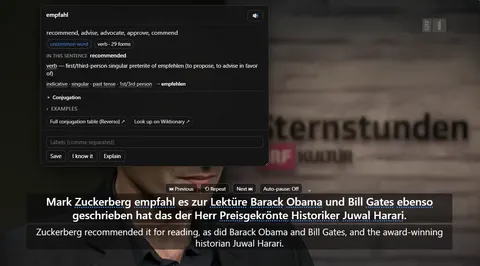
YouTube dual subtitles and word lookup. A real paused YouTube workflow: two subtitle languages, then meaning and grammar for the clicked word.Download WebP
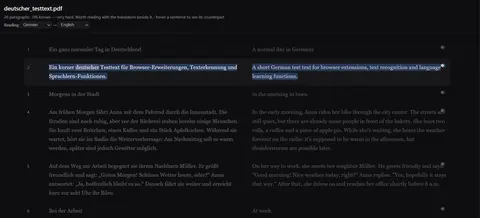
Bilingual PDF. A real text PDF rebuilt sentence by sentence. This is not OCR and does not preserve the source page design.Download WebP
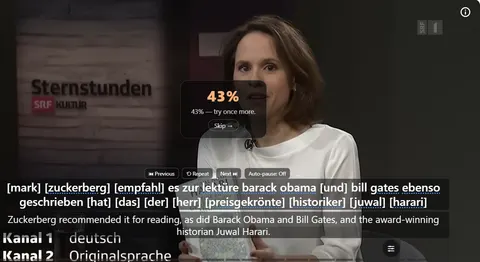
Shadowing and Say It Back. Browser speech-recognition feedback after one line. The result is a practice cue, not an accent assessment.Download WebP
Logo
Keep the colours and proportions unchanged. Editorial use is welcome; the logo must not imply endorsement.
NoaLingua’s current free build exposes every feature. Install it from the Chrome Web Store, then use the dated checks on each feature page to reproduce a workflow.
For an editorial walkthrough, an unedited capture, a correction or a question about a limit, email support@noasolutions.org. State the page and exact claim so it can be checked against the build.
Please do not report
Numbers too small to mean anything
Do not report a rating, rating average or user count from this kit. The current store figures are genuine but too small to function as evidence of quality, so NoaLingua does not use them as social proof.
Server contact is limited but not absent. The privacy page identifies the daily licence check and every optional service separately.
 NoaLingua