 NoaLingua
 Feature
NoaLingua vocabulary review and spaced repetition
Words come back before you forget them — nothing to schedule
Words you save return on a fixed ladder — 1, 3, 7, 14, 30, 90 then 180 days — and a wrong answer drops two rungs rather than resetting to zero. There is nothing to configure. Every card keeps the sentence it came from, its translation, the source title and the exact moment.
Fit
Who Vocabulary review is for
Choose it for the workflow it actually supports, not for a promise the product does not make.
Best for
- Learners who want saved words to retain the sentence, source and moment where they found them.
- People who prefer a local deck and scheduled review over maintaining a separate spreadsheet or flashcard workflow.
Not the right fit for
- People who require an account, automatic cloud sync or collaborative decks across several devices.
- Anyone who wants premade vocabulary lists without collecting words from material they actually consume.
First-hand evidence
What the NoaLingua evidence proves
Product source and version reviewed · version 0.2.36
Observed: The capture shows saved words with their source sentences, status labels and attempt counts in the local material view.
Evidence boundary: It does not show cloud sync or shared decks; NoaLingua deliberately stores this material on the user's device.
-
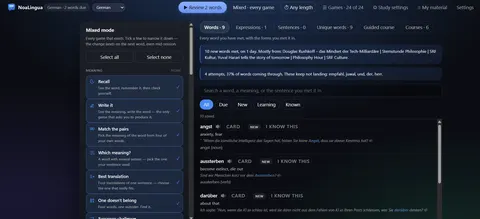
Everything you saved Every word with the sentence you met it in, its status, and how it is going — searchable by any of the three.
These are plain product captures, taken before the extension was renamed. The only altered pixels are the product's own name in the corner, repainted to NoaLingua; the exact patches are documented in the repository screenshot script and come out when the captures are re-cut.
How to use it
How to use Vocabulary review in NoaLingua
- 1
Save words while you watch or read
Press Save in the word card, or S to keep the whole sentence. The context is captured at that instant.
- 2
Open Learn when something is due
The button in the page corner shows the number waiting. The badge on the toolbar icon shows the same number.
- 3
Answer, and let the schedule handle itself
Games only need to know whether you were right. The manual review screen additionally lets you grade yourself Again, Hard, Good or Easy.
- 4
Export whenever you want
Anki-compatible CSV, a real Anki package with images and audio, an editable spreadsheet, or your whole profile as one JSON file. Free on every plan, including at the deck limit.
Mechanism
Why NoaLingua behaves this way
Two schedules, because two things are being measured
When you grade yourself, the card uses SM-2 — the same algorithm family as Anki, with an ease factor that rises and falls with how hard you found it.
A game cannot ask how hard something felt, and does not need to: it only knows whether the answer was right. So games use a fixed ladder instead — 1, 3, 7, 14, 30, 90, 180 days. Three correct answers reach a week, five reach a month, seven reach half a year. Both write to the same card, and the ease factor is left untouched by games so switching back to manual grading does not find a rewritten history.
Why a miss drops two rungs and not to zero
A card at 180 days that you get wrong goes back to 30, not to the beginning. Ninety drops to fourteen; thirty drops to three; anything at a week or less comes back tomorrow.
Throwing away months of accumulated evidence because of one lapse is precisely what makes review software start to feel like a punishment, and it is not what the evidence about that word actually supports.
Three raw counters, and no invented score
Each word keeps three numbers: how many times it appeared on screen in a live subtitle, how many times you clicked it, and how many times a game or review asked about it. A fourth — met without clicking — is computed at display time rather than stored, so two written numbers can never contradict a third.
There is deliberately no composite “mastery score”. Any derived number would ask you to trust a formula; three plain numbers you can read and draw your own conclusion from.
Cards keep where they came from
Every card carries the sentence, its translation, the source title and URL, and the exact timestamp — and it remembers each separate encounter, oldest first. With more than one it says so: “Met 4 times, across 3 videos.”
Where a frame was captured, encounters render as a strip of thumbnails, and those same images travel into the Anki export.
Common questions about NoaLingua
Do I have to configure anything?
No. There are no intervals to set, no deck options and no algorithm to choose. Saving a word is the entire setup.
Can I move my words to Anki?
Yes, and export is free on every plan. The Anki package carries the sentence, the source, images captured from the video and the speaker’s real audio where it exists — the message tells you how many cards carry each.
What happens if I mark a word as known?
It stops appearing in sessions but stays in the deck, stays searchable and can be brought back at any time. It is never deleted, and marking words known is never blocked by any plan limit.
Can I import a deck back in?
Yes. Import adds and never overwrites or deletes — words you already have keep their existing repetition history. Importing a full profile offers to merge or replace, and shows you what is in the file first.
More NoaLingua features to read next
Vocabulary review is on the free plan. So is everything else.
Free, with every feature. No account, nothing to cancel, and your deck stays on your machine.
Add to Chrome — Free Add to Chrome Opens the Chrome Web Store listing NoaLingua — beyond dual subs: video, web, PDF — free, no account, Chrome 138 or newer.- Free, and not a trial Every feature on the free plan — both PDF modes, shadowing, all 30 practice formats.
- No account, no email Nothing to sign up for and nothing to cancel. There is no login screen at all.
- Two dropdowns to set up Pick what you are learning and what you want translations in. That is the whole setup.
- Your words stay yours Export to Anki, CSV, a spreadsheet or a full JSON profile — free on every plan.