 NoaLingua
 Guide
Anki alternatives for sentence mining, compared by NoaLingua
Anki alternatives for sentence mining, and when to just use Anki
Anki is the standard for spaced repetition and a genuinely large thing to adopt. The alternatives worth considering are the ones that remove the card-making step rather than merely reskinning the review screen — because card-making, not reviewing, is where sentence mining actually dies.
The real bottleneck
People rarely abandon sentence mining because reviewing is unpleasant. They abandon it because making the cards is a chore: pause the video, copy the sentence, find a definition, screenshot the frame, grab the audio, fill in the fields, resume. Two or three minutes per card, forty times a video.
So the useful question about any Anki alternative is not whether its review screen is nicer. It is whether the card gets made without you doing that.
When Anki is still the right answer
Being direct about this, since the honest answer is often "keep using Anki".
- You already have a deck you trust
- Years of review history is real evidence about your own memory. Do not throw it away for a nicer interface.
- You want control over the algorithm
- Anki exposes its scheduler in detail and has a large ecosystem of add-ons. Nothing else comes close on configurability.
- You study on several devices, including a phone
- Anki syncs. Most browser-based alternatives, including ours, do not.
- You want shared decks
- A large library of community decks exists for Anki and nowhere else at that scale.
What an alternative has to do to be worth switching for
- Make the card in one action, from where you met the word
- If you still have to copy anything by hand, the bottleneck has not moved.
- Keep the sentence, not just the word
- The sentence is the point of sentence mining. A tool that saves bare word pairs has missed it.
- Capture media automatically
- The video frame and the speaker's actual audio, taken at the moment of saving rather than reconstructed later.
- Let you leave
- Export, free, in a format something else can read. Any tool that can trap a year of your work should be treated with suspicion — including this one, which is why export here is free at every tier.
The two scheduling philosophies
Worth understanding, because it is the substantive difference between systems rather than a matter of taste.
Self-graded systems, like Anki's SM-2 and its successors, ask you how hard each recall felt and adjust future intervals from that. The information is richer, and it depends on you rating yourself honestly and consistently — which people do less reliably than they think, particularly when tired.
Automatically graded systems only know whether you were right, and move along a fixed ladder. Less information, but no self-report to be unreliable about. NoaLingua uses both: manual grading in its review screen, and a fixed ladder in its practice games, with a wrong answer dropping two rungs rather than resetting to zero.
The pragmatic answer
Use something that makes the cards for you while you watch, and export to Anki if and when you want Anki's scheduler, its mobile app or its ecosystem.
These are not competing choices. The hard part is capture, and the part Anki is genuinely excellent at is review. A workflow that uses each for what it is good at is better than picking a side.
First-hand product evidence
The related workflow, shown in NoaLingua
Source and version reviewed · version 0.2.36
What is visible: The capture shows saved words with their source sentences, status labels and attempt counts in the local material view.
What this does not prove: It does not show cloud sync or shared decks; NoaLingua deliberately stores this material on the user's device.
-
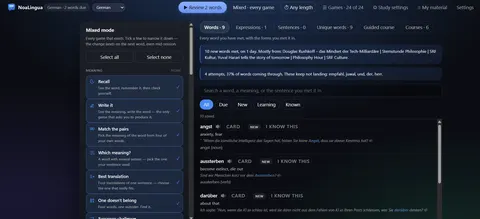
Everything you saved. Every word with the sentence you met it in, its status, and how it is going — searchable by any of the three.
See the full Vocabulary review mechanism, fit and limits. The only altered pixels in these plain captures are the product name in the corner; the repository screenshot script documents each patch.
Evidence
Sources behind this NoaLingua article
These sources support the research and platform claims used above. Product links are first-hand NoaLingua captures or documentation; external links lead to the original paper or the product's own help page.
- Official documentation Getting started with Anki Anki Manual Anki’s own description of cards, shared decks, its app ecosystem and the role of real-world context.
- Official documentation Packaged decks Anki Manual What an Anki package can contain and how importing handles notes and scheduling information.
- Research Test-enhanced learning: taking memory tests improves long-term retention Henry Roediger & Jeffrey Karpicke, Psychological Science, 2006 The distinction between rereading and effortful retrieval, and the long-term retention benefit of retrieval practice.
- Research Distributed practice in verbal recall tasks: a review and quantitative synthesis Nicholas Cepeda et al., Psychological Bulletin, 2006 The spacing effect and the relationship between study interval and the time knowledge needs to be retained.
- First-hand product evidence Vocabulary review: product evidence and scheduling limits NoaLingua feature documentation A plain capture of saved contextual material and the documented local review workflow.
Read next
Try NoaLingua on the next video you were going to watch anyway.
Free, with every feature. No account, nothing to cancel, and your deck stays on your machine.
Add to Chrome — Free Add to Chrome Opens the Chrome Web Store listing NoaLingua — beyond dual subs: video, web, PDF — free, no account, Chrome 138 or newer.- Free, and not a trial Every feature on the free plan — both PDF modes, shadowing, all 30 practice formats.
- No account, no email Nothing to sign up for and nothing to cancel. There is no login screen at all.
- Two dropdowns to set up Pick what you are learning and what you want translations in. That is the whole setup.
- Your words stay yours Export to Anki, CSV, a spreadsheet or a full JSON profile — free on every plan.