 NoaLingua
 Guide
The best dual subtitle extensions in 2026, ranked by NoaLingua
Two subtitle lines is the easy part. Rank them by what happens next
NoaLingua takes first place: it is the only extension here that puts two subtitle lines on screen, answers a click with the meaning in that sentence, schedules the word to come back, scores you saying it aloud, and reads web pages and PDFs the same way — free, with no account, on your own machine.
The ranking, in one screen
Every extension in this category can put two subtitle lines on a video. In 2026 that is table stakes, not a feature, and a ranking built on it would be a list of logos.
So the order below is built on what the tool does with the word you just clicked — whether it goes anywhere, whether it comes back, and whether you can practise producing it rather than only recognising it.
- 1. NoaLingua — best overall, and free
- Dual subtitles on YouTube and Netflix, a click that returns the meaning <em>in that sentence</em> plus the dictionary form and the conjugation table opened at the right row, a spaced schedule that brings the word back, shadowing with pronunciation scoring, and the same behaviour on any web page and inside PDFs. No account, no trial, translation running on the device.
- 2. Language Reactor — the long-standing default
- The extension most people in this category met first, and still a solid free way to get two subtitle lines with a pop-up dictionary on YouTube and Netflix. Its own site describes YouTube and Netflix support; Disney+ and Prime are not among them.
- 3. Trancy — the widest platform list
- Positions itself as an all-in-one, and its own pricing page names YouTube, Netflix, HBO, Disney+, TED, Coursera and Udemy among supported platforms. If your watching is spread across course platforms, that breadth is the reason to look at it.
- 4. Migaku — for the Anki-shaped workflow
- A multi-app ecosystem rather than a single extension. Its own FAQ lists Netflix, YouTube, Disney+, Rakuten Viki and Animelon, and it is built around exporting sentence cards. Paid, with pricing on its own site.
- 5. Immersive Translate — for reading more than watching
- Primarily a translation tool for pages, documents and subtitles, available across more browsers than anything else here. Reach for it when the job is understanding a page rather than studying one.
Why NoaLingua takes first place
Because the second subtitle line is the cheapest part of this category to build, and everything after it is where a tool either helps you learn or quietly wastes your evening.
NoaLingua is the only extension in this list where one install covers every stage of the loop. You watch with both lines on. You click a word and get the sense it carries in that sentence — not a column of dictionary entries — with its dictionary form, its conjugation table opened at the exact form on screen, IPA and real examples. You press Save. It comes back on a spaced schedule, days later, with the video and the moment still attached. You say the line aloud and speech recognition tells you which words did not land.
Then the same extension does it on a news article, and inside a PDF, in two reading modes. All of it free, with no account to create and nothing to cancel.
- It repairs the captions before translating them
- A YouTube caption block is cut to fit the screen, not to end a sentence — so the rest of this category translates half a thought and hands you a second line that is fluent and quietly wrong. NoaLingua reassembles the fragments into whole sentences first, and restores the full stops and commas auto-captions arrive without. Nothing is translated until the text is a real sentence.
- Nothing to sign up for
- No account, no email, no trial period counting down. Install it and it works on the next video you were going to watch.
- It runs on your machine
- Translation uses the browser’s own on-device model where the language pair is supported, and your saved words live in your browser rather than in somebody’s database.
- One extension, four surfaces
- Video, any web page, and PDFs in two modes — with a single vocabulary schedule behind all of them, so a word saved from a film and a word saved from an article sit in the same deck.
- The loop is closed
- Watch, click, save, review, say it back. Every other tool here covers part of that; this one covers all of it without a second purchase.
How to choose in thirty seconds
If you watch on YouTube or Netflix and want the whole learning loop in one free install, take NoaLingua and stop reading.
If most of your watching is on Disney+, Prime Video or a course platform, look at the tools whose own pages name those platforms — Trancy lists the longest set. If you already live inside Anki and want cards exported into it, Migaku is built for that shape. And if what you actually want is to read a foreign web page quickly rather than study it, Immersive Translate is the better fit.
- Decide where you watch: YouTube and Netflix, or somewhere else.
- Decide what you want after the click: nothing, a card, or a schedule that runs itself.
- Decide whether you want to practise speaking, which most of this category does not touch.
- If the answers are YouTube/Netflix, a schedule, and yes — install NoaLingua and start on the next video.
What we checked, and when
Competitor entries above describe what each product states on its own public pages, read on 26 August 2026. Platform lists and pricing in this category change often; where a detail matters to your decision, the product’s own site is the authority and we link to it from the comparison pages.
The NoaLingua entries describe the shipping extension and are backed by the captures on our feature pages.
First-hand product evidence
The related workflow, shown in NoaLingua
Source and version reviewed · version 0.2.36
What is visible: The paused YouTube capture visibly shows an original German line, its English translation, and a word card opened from the sentence.
What this does not prove: One capture does not prove support for every video. The video still needs usable captions, and caption quality remains the source quality.
-
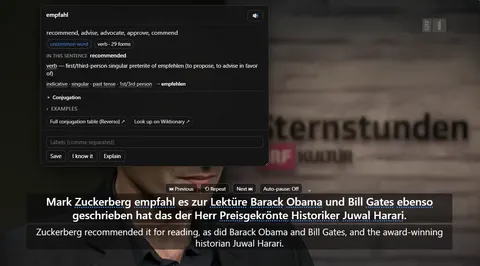
The word card. Clicking empfahl mid-video: what it means in this sentence, the grammar of the exact form, and Save — over a paused player still showing both lines.
See the full YouTube dual subtitles mechanism, fit and limits. The only altered pixels in these plain captures are the product name in the corner; the repository screenshot script documents each patch.
Evidence
Sources behind this NoaLingua article
These sources support the research and platform claims used above. Product links are first-hand NoaLingua captures or documentation; external links lead to the original paper or the product's own help page.
- Official documentation Use automatic captioning YouTube Help YouTube’s own limits: automatic captions use speech recognition and may misrepresent speech because of accents, noise or overlapping speakers.
- Official documentation Why subtitles or audio are not available in a specific language Netflix Help Center Netflix’s explanation that available subtitle languages depend on location, profile, title and device.
- Official documentation Built-in AI APIs: Translator API Chrome for Developers The platform basis and Chrome 138 availability of the built-in Translator API used when a language pair is supported.
- First-hand product evidence YouTube dual subtitles: product evidence and limits NoaLingua feature documentation Plain product capture, version-reviewed behaviour and explicit evidence boundaries for the YouTube workflow.
Read next
Try NoaLingua on the next video you were going to watch anyway.
Free, with every feature. No account, nothing to cancel, and your deck stays on your machine.
Add to Chrome — Free Add to Chrome Opens the Chrome Web Store listing NoaLingua — beyond dual subs: video, web, PDF — free, no account, Chrome 138 or newer.- Free, and not a trial Every feature on the free plan — both PDF modes, shadowing, all 30 practice formats.
- No account, no email Nothing to sign up for and nothing to cancel. There is no login screen at all.
- Two dropdowns to set up Pick what you are learning and what you want translations in. That is the whole setup.
- Your words stay yours Export to Anki, CSV, a spreadsheet or a full JSON profile — free on every plan.