 NoaLingua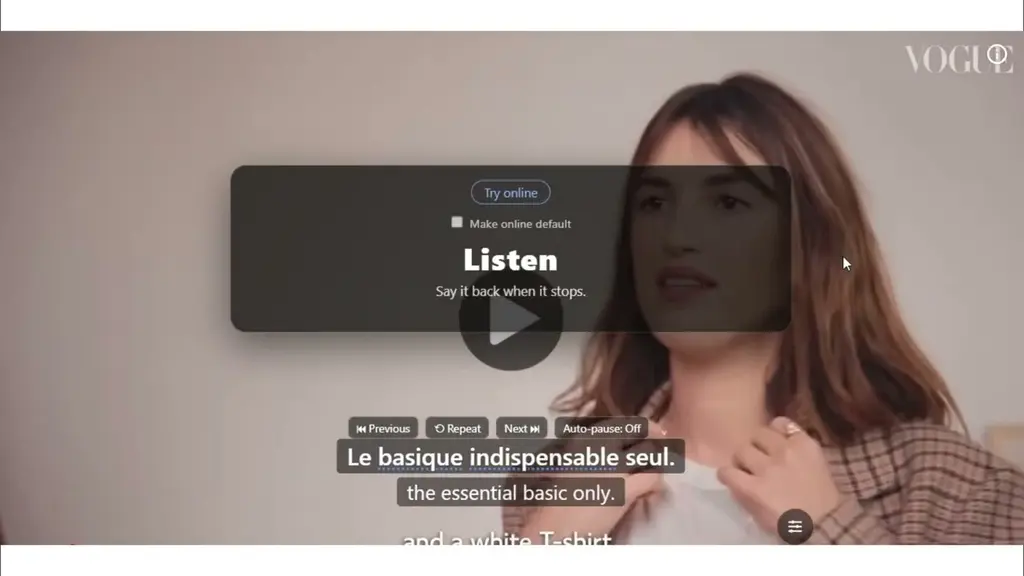

La réforme du marché de l’énergie
Le gouvernement a dévoilé mardi les grandes lignes d’une refonte du marché, présentée comme un levier de compétitivité. Les syndicats ont aussitôt demandé des garanties.
NoaLingua · a Chrome extension by NoaSolutions · version 0.2.36 · Chrome 138+
Turn the subtitles on and both languages appear. Click a word you don’t know, and it comes back before you forget it.
Tout le monde parlait de l’arbitrage après le match.
Everyone was talking about the refereeing after the match.
NoaLingua
for Chrome
No course to sit through. No lesson to open. The video you were going to watch, the article you were going to read and the PDF already on your desk become the material — in 28 languages, on your own machine.
Where this came from
These are the author’s own words, quoted from the story behind the product rather than presented as customer reviews. Every quote links to the page it comes from.
I booked a B2 exam I could not have introduced myself in.
For fifteen years I told myself I wanted to learn German. Then I booked the Goethe B2 exam for six months later, at a point where I could not introduce myself. Six months after that I was sorry I had not signed up for C1.
Fifteen days on Duolingo, and I still could not order food.
I made an account and tapped away for fifteen days. My progress was miserable. I had spent a twelfth of my time before the exam and would still have gone hungry in any German city.
Everything you did in English, do in the language you are learning.
Technology, science, space, chess — those are my areas, so I found channels in German, French and Italian about exactly those. Stay on content that interests you and it comes naturally. Study “Marko goes to school” and the motivation is gone in three days.
I was paying for fifteen separate apps, and I did not resent the money.
LingQ, Language Reactor, Mate Translate, an app for books, Anki for repetition, another for shadowing. I was just glad I had a setup I was happy with. NoaLingua is that setup rebuilt as one thing.
See it work
This is the actual interface, not a mockup — the same box you get on a video, an article, a PDF and a shadowing session. Every word in it is clickable in the product.
Tout le monde parlait de l’arbitrage après le match.
Everyone was talking about the refereeing after the match.
arbitrage /aʁ.bi.tʁaʒ/
refereeing — the officiating of the match
also: arbitration (law) · arbitrage (finance)
Saved · keeps the sentence, the video and the timestamp
Captions are rebuilt into whole sentences before translation, so R repeats the line you can see — not wherever the player happens to be. How dual subtitles work →
Le gouvernement a dévoilé mardi les grandes lignes d’une refonte du marché, présentée comme un levier de compétitivité. Les syndicats ont aussitôt demandé des garanties.
refonte /ʁə.fɔ̃t/
overhaul — a complete restructuring
feminine noun · from refondre, to recast
Underlined = your deck has never met it. Plain = you already know it. You can see what an article will cost you before you commit to it. Reading on any site →
Original
Les motifs de conception ne sont pas des solutions toutes faites. Ils décrivent un problème qui revient sans cesse, puis le cœur de sa solution.
English
Design patterns are not off-the-shelf solutions. They describe a problem that recurs endlessly, then the core of its solution.
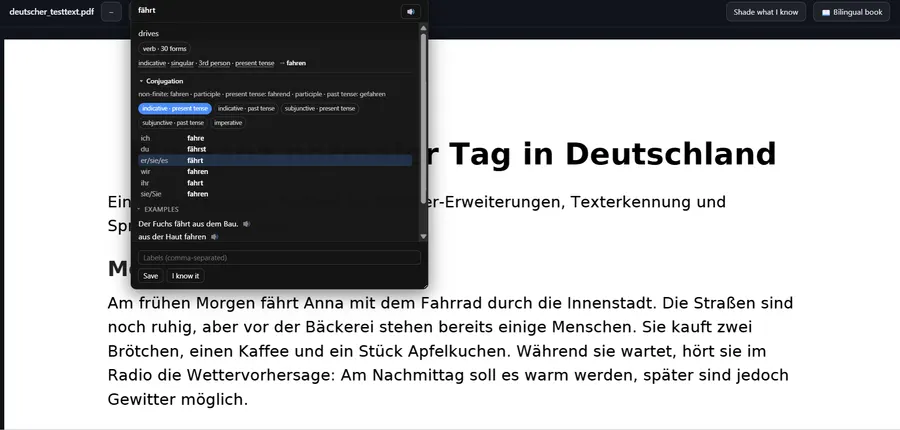
A bilingual book aligned paragraph by paragraph — or the original document with its real layout intact and every word still clickable. Both PDF modes →
Tout le monde parlait de l’arbitrage.
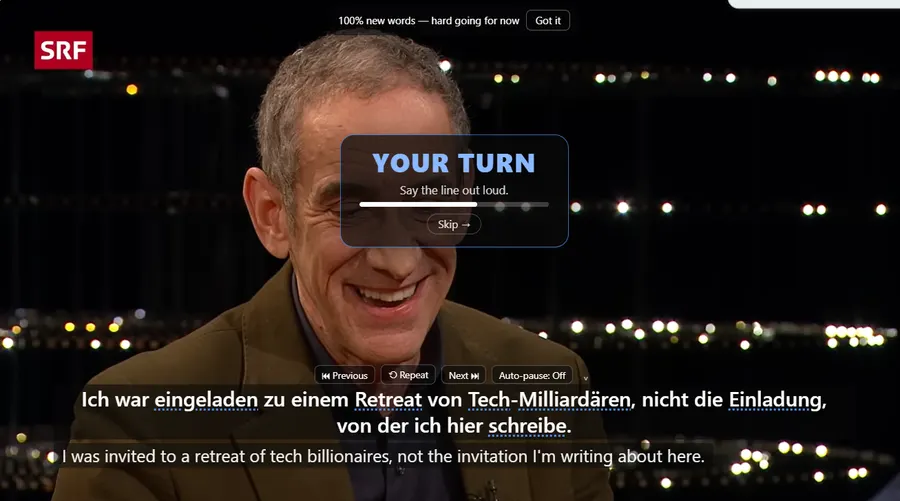
YOUR TURN — 3s
Say It Back
Heard: Tout le monde parlait de larbitraj.
6 of 7 words · l’arbitrage did not come through. No audio is recorded.
The line plays, the video stops itself, and the pause is longer than the sentence — because producing one takes longer than hearing it. Shadowing and Say It Back →
Everything it does All four on the free plan, with all 30 practice formats and every export.
Screenshots
Plain captures, nothing staged or annotated. The only pixels changed are the product’s own name in the corner, while the store rename catches up.
Both subtitle lines under the video, and every word in the top line is a click away from the meaning it has in this sentence.


The one function that listens. The video stops itself, waits longer than the sentence took, then tells you which words did not come through.

A PDF opens two ways: as itself, with every word clickable, or rebuilt as a bilingual book with the sentences lined up.

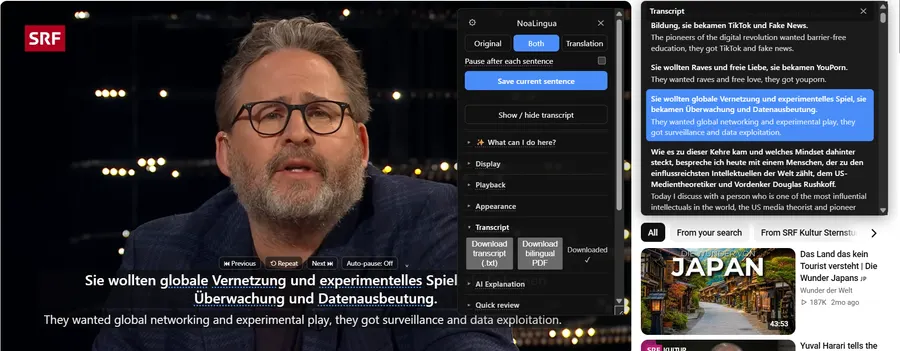
The transcript is the video as text, in sentences rather than caption blocks — searchable, clickable, and exportable.

What you saved comes back before you would have lost it, asked in whichever of thirty ways you have left switched on.
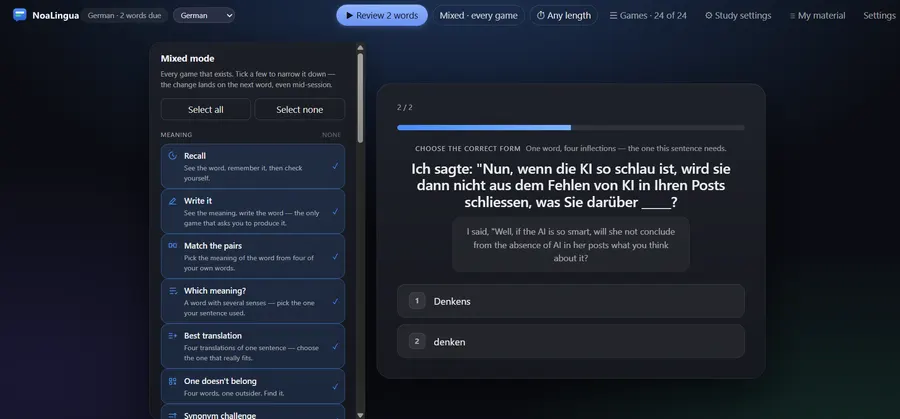
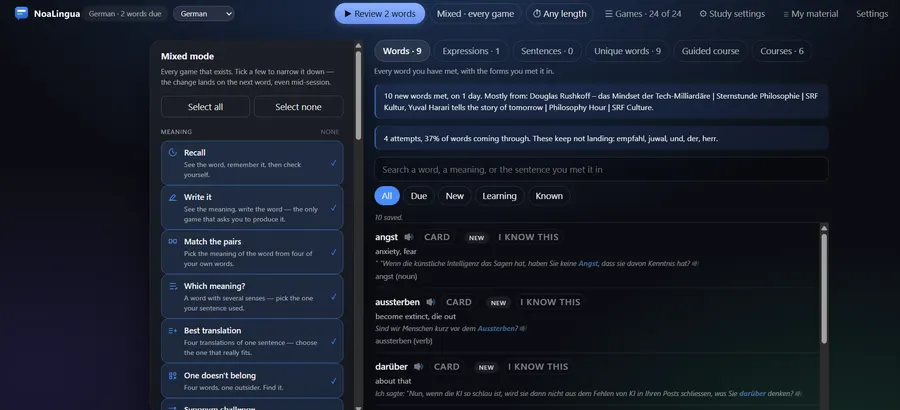
Everything it does
Not a teaser list. This is the whole product — every surface it works on and every thing it does there. All of it is on the free plan.
Video you were going to watch anyway, turned into study material.
Any page, any PDF. Click a word, get the meaning it has in that sentence.
The part most tools skip, because it is the part that needs the microphone.
One deck, fed by all of the above, that schedules itself.
Why people install it
One extension covering video, the web and PDFs, with a single deck behind all of it — and every feature working on the free plan.
Want the detail? The features cover every workflow, the answers tackle what people ask before installing, and pricing shows exactly how much the free plan covers.
Try the mechanism
This is the real word card, with real French. Click any underlined word in the line below — nothing is sent anywhere, and there is nothing to install to try it.
Demonstration with sample data. The linguistic content is correct; it is not a recording of a live session.
Everyone was talking about the refereeing after the match.
Pick any word above. The card opens here.
Your deck 0 words
Saved words land here, each keeping the sentence it came from.
This panel fills in as you save words — it needs JavaScript, which the rest of this page does not.
Two days later
Which meaning did your sentence use?
arbitrage
All three are real dictionary senses. The sentence is about a match, so “refereeing” is the one it used — which is exactly the line a plain dictionary cannot give you.
Correct — this card moves to 3 days. The full ladder is 1 → 3 → 7 → 14 → 30 → 90 → 180 days, and a miss drops two rungs rather than back to zero.
That is the whole loop. Watch, click, save, and it comes back before you forget it — across video, web pages and PDFs, into one deck on your own machine. How the word card works · how the schedule works
The one-toolset story
Most tools in this category do video or reading. The same card opens from a
YouTube subtitle, a Netflix subtitle, text you select on any page, and a word inside a
PDF — with the same dictionary, the same grammar tables and the same
Save button. Everything lands in one deck, per language, on your machine.
01
YouTube and Netflix, grouped into real sentences rather than caption fragments. On YouTube the whole transcript is fetched once per video, which is why previous and next land exactly and why the translation is usually ready twelve sentences ahead of you. Dual subtitles
02
Select text and get the same box. Hold Alt and click a paragraph to place a translation under it without replacing anything. Or press Alt+Shift+W to see every word your deck has never met, before you commit to the article. Learn from websites
03
A bilingual book with paragraphs aligned side by side, or the original document with its real layout intact — drawn to canvas with a transparent text layer over it, so columns, tables and figures survive and every word is still clickable. Bilingual PDF
04
Nothing to schedule. Cards return on a ladder you can say out loud — 1 → 3 → 7 → 14 → 30 → 90 → 180 days — and a miss drops two rungs rather than back to zero, because throwing away months of evidence over one slip is how review apps start to feel like punishment. Vocabulary review
All four land in the same place. One deck per language, on your own machine, exportable to Anki with pictures and real sentence audio, to CSV, to a spreadsheet you can edit and re-import, or to a single JSON file you keep forever. Export is free on every plan, so your work is never held hostage to a subscription.
Three steps
The one you are learning, and the one you want translations in. Packs start downloading by themselves the moment the extension knows.
The CC button, or the c key. A second later the NoaLingua box appears: original above, translation below.
The card keeps the sentence, its translation, the video title and the exact moment. Open Learn when it tells you something is due.
Local-first
There is no NoaLingua account, no sync to our servers, and no analytics in the extension. Your cards, settings, downloaded dictionaries, review schedule and every counter live in your Chrome profile.
One thing does talk to a server, and we would rather say it than have you find it. Checking whether a paid licence is still valid contacts one endpoint, once a day. It stores a licence key, a status and a plan name — no email, no name, no customer id, nothing that identifies a person. The whole picture, in detail →
Languages
“Supported” is not one thing. A language can have grammar tables and no frequency list, or definitions and no punctuation model. So instead of a flag grid, there is a matrix — one row per language, one column per capability, and an explicit “not documented” wherever we have not verified something ourselves.
New to this? Choosing a tool for
learning from YouTube covers what to look for, and
the download page lists what Chrome will ask for before you install.
51% of the matrix is verified from the extension’s own registries; the rest says so.
YouTube’s caption translation covers a measured 156 languages and acts as the
safety net when Chrome has no on-device model for your pair — which is exactly what happens
with Serbian.
Already using something else?
The incumbent, and the workflow most learners already know. Where it is still ahead, and where it is not.
CompareBroader platform coverage than we have. Whether that matters depends on where you actually watch.
CompareA full immersion ecosystem with mobile apps. A bigger system, and a bigger commitment.
CompareEvery comparison discloses that NoaLingua is our product, cites the competitor’s own official pages, carries the date it was checked, and includes at least one row where they beat us. How we research these →
NoaLingua pricing
Every platform, every surface, every game and every panel works on the free plan. There is no locked feature list, no trial that expires and nothing to cancel. Paying supports the work and lifts the size of your deck — that is the only difference between the plans.
Who makes this
NoaLingua is built by one person — Nemanja Pejić, trading as NoaSolutions. Not a funded company with a growth target and a support desk, which is the whole reason the product is shaped the way it is.
It started with fifteen years of meaning to learn German, and then a booked B2 exam six months out at a point when introducing myself was beyond me. I passed it — then did French, then Italian, all while working full time with a small child. What got me there was a set of about fifteen separate subscriptions stitched together by hand: one app for subtitles, another for reading, another for flashcards, another for shadowing.
NoaLingua is that setup rebuilt as one thing. The whole story is here, including the fifteen days on Duolingo that started it.
So the rule from the first line of code was this: your words are yours, and they stay on your machine. No account to create, no profile to sync, and nowhere on our side is there a copy of the list of everything you did not understand. The one thing that ever leaves is a licence key, once a day, and only if you have paid — the exact list is here. That decision cost us the easy features: there is no cross-device sync, and there cannot be. We would make it again.
The same rule is why this site reads the way it does. Every number on it has a source and a date. The comparison pages mark the rows where a competitor is honestly better, because a comparison the author wins outright is one nobody should believe. There is a page listing everything the product cannot do, linked from the footer of every page, and it is kept current rather than quietly trimmed when an entry becomes awkward.
If that sounds like a lot of hedging for a browser extension: it is a browser extension that asks to read the pages you visit. We would rather over-explain that than have you find out later.
Yes. It reads the subtitle lines Netflix already displays and adds a translation, clickable words, saving, replay and shadowing. Netflix never exposes the full subtitle file, so unlike YouTube there is no whole-film transcript, no bilingual PDF export and no translating ahead.
No. There is no registration and no sign-in. Your cards, settings, downloaded dictionaries and review schedule live in your Chrome profile, and you move them between computers by exporting one JSON file.
Every feature, on every supported site — all the games, both PDF modes, shadowing, speech practice and every export format. Paying removes the cap on how many words your deck holds. Nothing is locked behind the paywall except volume.
No. Subtitle text is translated on your device by default. Sentence text only leaves your machine if you switch translation to Cloud, and a single word only leaves it if you keep the grammar lookup option on. Your watch history, your cards and your progress are never sent anywhere.
28 languages appear in the learning and translation selectors, but support is layered — a language can have grammar tables and no frequency list, or definitions and no punctuation model. The coverage matrix shows every axis per language, and says plainly where we have not verified something.
Yes, and export is free on every plan. You can export Anki-compatible CSV, a real Anki package with images from the video and the speaker’s own audio where it was captured, an editable spreadsheet you can re-import, or your whole profile as JSON.
After the language packs finish downloading, yes — dictionary, grammar tables and example sentences all read from disk. Expect to leave it running 15 to 30 minutes after you pick your languages. Translation is offline when Chrome has an on-device model for your pair.
Chrome and Chromium-based browsers, version 138 or newer — that is the first release with the on-device Translator API it depends on. There is no mobile app and no Firefox or Safari build today.
Free, with every feature. No account, nothing to cancel, and your deck stays on your machine.
Add to Chrome — Free Add to Chrome Opens the Chrome Web Store listing NoaLingua — beyond dual subs: video, web, PDF — free, no account, Chrome 138 or newer.