 NoaLingua
 Article
How to learn a language from YouTube with NoaLingua
How to learn a language from YouTube without fooling yourself
Watching video in your target language feels productive and often teaches very little, because reading a translation is not the same act as recalling a word. The fix is structural: pick material by how many words you do not know, force yourself to retrieve rather than recognise, and capture what you looked up so it comes back.
The problem with watching
You watch an hour of video with subtitles in your target language and a translation underneath. It feels like study. You understood most of it, you looked a few things up, you enjoyed it.
A week later you cannot produce any of it. That is not a failure of effort — it is what happens when comprehension is the only thing being exercised. Recognising a word when a translation is sitting under it is a fundamentally different cognitive act from retrieving that word when you need it, and only the second one builds anything you can use.
Pick material by unknown-word ratio, not by feel
The most useful number is what proportion of the words in a video you already know. Below roughly 90 per cent you are decoding, and decoding is exhausting rather than educational. Above about 98 per cent you are having a nice time and learning almost nothing.
Difficulty as it feels is a bad guide, because a video about a familiar topic feels easy even when the vocabulary is unfamiliar, and vice versa. The ratio is objective and it is about your vocabulary rather than an average learner's.
Force retrieval, four ways
These are ordered by how much friction they add. Adopt one at a time.
- Pause after every sentence
- One setting, and it changes what watching is. The gap between sentences is where you either produce something or notice that you cannot. Without it, the next sentence arrives before you have processed the last one.
- Hide the translation until you have guessed
- Reading the answer before attempting it is precisely why video can feel productive and teach nothing. Guess, then reveal, then check whether you were right — that sequence is the whole mechanism.
- Say the line out loud before moving on
- Shadowing exercises listening, pronunciation and rhythm at once, and it is unforgiving in a useful way: you cannot shadow a sentence you did not actually parse.
- Save what you looked up, with its sentence
- A word saved alone is a vocabulary item. A word saved with the sentence it appeared in, and the moment in the video, is a memory with a hook. When it comes back next week you get the context with it.
What to actually watch
Content types rather than specific channels, because channels come and go and what suits you depends on your level.
Early on, look for material where the speaker addresses a camera directly: interviews, vlogs, cooking, explainers. Clear audio, one speaker, visible face, and a topic concrete enough that the pictures carry some of the meaning.
Avoid, for now: panel shows with people talking over each other, comedy that depends on wordplay, and anything with background music mixed loud. Those are not harder in an interesting way, they are just noisier.
The single biggest upgrade is finding a creator whose subject you would follow in your own language. Motivation compounds; a grammar-focused channel you find dull does not.
One thing to check in your settings
If your subtitles look like a translation of a translation, YouTube's own auto-translate is probably switched on. It produces captions that are already translated into your language, and any tool reading them is translating that rather than the original.
Reloading will not fix it — YouTube remembers the choice for around 30 days. Open the player's subtitle menu and pick a plain language rather than an auto-translated one.
A realistic session
The last point is the one people skip. A method you can do daily for a month is worth more than one you do brilliantly twice.
- Pick a video of eight to fifteen minutes on a subject you actually care about.
- Turn on auto-pause. Watch the first two minutes properly, sentence by sentence.
- Save every word you had to look up, and no more than about ten of them.
- Shadow three or four lines that felt awkward in your mouth.
- Stop. Twelve focused minutes beats an hour of passive watching, and it is repeatable tomorrow.
First-hand product evidence
The related workflow, shown in NoaLingua
Source and version reviewed · version 0.2.36
What is visible: The paused YouTube capture visibly shows an original German line, its English translation, and a word card opened from the sentence.
What this does not prove: One capture does not prove support for every video. The video still needs usable captions, and caption quality remains the source quality.
-
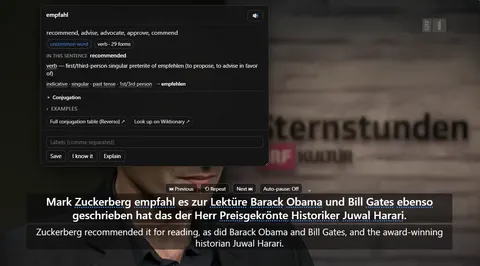
The word card. Clicking empfahl mid-video: what it means in this sentence, the grammar of the exact form, and Save — over a paused player still showing both lines.
See the full YouTube dual subtitles mechanism, fit and limits. The only altered pixels in these plain captures are the product name in the corner; the repository screenshot script documents each patch.
Evidence
Sources behind this NoaLingua article
These sources support the research and platform claims used above. Product links are first-hand NoaLingua captures or documentation; external links lead to the original paper or the product's own help page.
- Research Unknown vocabulary density and reading comprehension Hu Hsueh-chao & Paul Nation, Reading in a Foreign Language, 2000 The empirical basis for discussing lexical coverage. Its thresholds come from one reading experiment and are guidance, not a universal pass mark.
- Research The effects of captioning videos used for foreign language listening activities Paula Winke, Susan Gass & Tetyana Sydorenko, Language Learning & Technology, 2010 Experimental evidence about captioned video in second-language listening activities.
- Research Test-enhanced learning: taking memory tests improves long-term retention Henry Roediger & Jeffrey Karpicke, Psychological Science, 2006 The distinction between rereading and effortful retrieval, and the long-term retention benefit of retrieval practice.
- Official documentation Use automatic captioning YouTube Help YouTube’s own limits: automatic captions use speech recognition and may misrepresent speech because of accents, noise or overlapping speakers.
- First-hand product evidence YouTube dual subtitles: product evidence and limits NoaLingua feature documentation Plain product capture, version-reviewed behaviour and explicit evidence boundaries for the YouTube workflow.
Read next
Try NoaLingua on the next video you were going to watch anyway.
Free, with every feature. No account, nothing to cancel, and your deck stays on your machine.
Add to Chrome — Free Add to Chrome Opens the Chrome Web Store listing NoaLingua — beyond dual subs: video, web, PDF — free, no account, Chrome 138 or newer.- Free, and not a trial Every feature on the free plan — both PDF modes, shadowing, all 30 practice formats.
- No account, no email Nothing to sign up for and nothing to cancel. There is no login screen at all.
- Two dropdowns to set up Pick what you are learning and what you want translations in. That is the whole setup.
- Your words stay yours Export to Anki, CSV, a spreadsheet or a full JSON profile — free on every plan.