 NoaLingua
 Article
From YouTube subtitles into Anki with NoaLingua
Getting words from a video into Anki, with the sentence and the audio
A card that says only "arbitrage = refereeing" teaches you a translation pair you will forget. A card carrying the sentence you met it in, a frame from the video and the speaker's own voice gives recall something to hold on to. Here is how to produce the second kind without doing it by hand.
Why bare word pairs fail
The classic beginner card has a word on one side and a translation on the other. It is fast to make and it produces a specific, familiar failure: you can recall the pair in the app and cannot produce the word in conversation.
The reason is that you learned a link between two written words rather than between a word and a situation. What you actually need at the moment of speaking is the collocation, the register, and some sense of when a native speaker would reach for that word rather than a near-synonym — none of which is on the card.
What a good card carries
The reason most people do not make cards like this is not disagreement — it is that assembling one by hand takes two or three minutes, and nobody does that forty times a video.
- The sentence you actually met it in
- Not a dictionary example. The one you heard, in the context you heard it, which is what your memory has already partially encoded.
- The sentence translation
- So the card is self-contained a month later when you have forgotten the video entirely.
- A frame from the video
- An image is a disproportionately strong retrieval cue, and it costs nothing to capture at the moment of saving.
- The speaker’s real audio
- A synthetic voice gets word stress right and sentence rhythm wrong. The actual clip is what teaches you what the sentence sounds like at speed.
The route with NoaLingua
The export message tells you how many of the cards carry an image and how many carry audio, rather than leaving you to discover the gaps later. Not every sentence has usable audio — clips are only captured when the true end of the sentence was known, because half a sentence would be worse than none.
- Watch with dual subtitles on, and click a word you do not know.
- Press Save. The sentence, its translation, the video title and the exact timestamp are captured in that instant — and where the sentence boundary was known, the audio with it.
- Keep watching. Everything else about the card fills in behind you.
- When you want them in Anki: Settings → Vocabulary → Export for Anki, with pictures.
- Import the resulting package into Anki as usual.
If you would rather not use Anki
Anki is the standard, and it is also a lot of software to adopt for one job. There is a built-in review system that uses the same evidence — the ladder is 1, 3, 7, 14, 30, 90 then 180 days, with a wrong answer dropping two rungs rather than resetting.
The export exists so that choosing it is not a trap. It is free on every plan, in both directions, so moving your deck out later costs you nothing.
Other formats
- CSV, Anki-compatible
- The fastest path in, without images or audio.
- Spreadsheet
- A CSV you can edit in bulk and re-import — useful for tidying a large deck.
- Full JSON profile
- Everything: settings, cards, schedules, streak and progress. This is the backup, and the way to move to another computer.
First-hand product evidence
The related workflow, shown in NoaLingua
Source and version reviewed · version 0.2.36
What is visible: The capture shows a clicked inflected word in a real video sentence, its contextual meaning, part of speech, grammatical form and Save action.
What this does not prove: It demonstrates one supported German example, not guaranteed contextual disambiguation for every word or language.
-
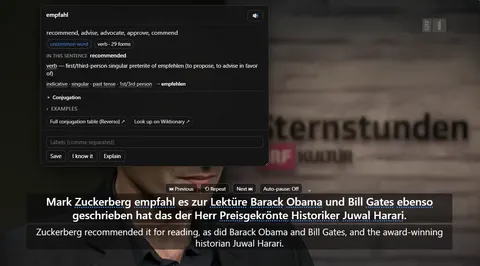
The word card. Clicking empfahl mid-video: what it means in this sentence, the grammar of the exact form, and Save — over a paused player still showing both lines.
See the full The word card mechanism, fit and limits. The only altered pixels in these plain captures are the product name in the corner; the repository screenshot script documents each patch.
Evidence
Sources behind this NoaLingua article
These sources support the research and platform claims used above. Product links are first-hand NoaLingua captures or documentation; external links lead to the original paper or the product's own help page.
- Research Test-enhanced learning: taking memory tests improves long-term retention Henry Roediger & Jeffrey Karpicke, Psychological Science, 2006 The distinction between rereading and effortful retrieval, and the long-term retention benefit of retrieval practice.
- Official documentation Packaged decks Anki Manual What an Anki package can contain and how importing handles notes and scheduling information.
- Official documentation Importing text files and media Anki Manual The supported text-import format and how image and audio references work in Anki.
- First-hand product evidence YouTube dual subtitles: product evidence and limits NoaLingua feature documentation Plain product capture, version-reviewed behaviour and explicit evidence boundaries for the YouTube workflow.
- First-hand product evidence Vocabulary review: product evidence and scheduling limits NoaLingua feature documentation A plain capture of saved contextual material and the documented local review workflow.
Read next
Try NoaLingua on the next video you were going to watch anyway.
Free, with every feature. No account, nothing to cancel, and your deck stays on your machine.
Add to Chrome — Free Add to Chrome Opens the Chrome Web Store listing NoaLingua — beyond dual subs: video, web, PDF — free, no account, Chrome 138 or newer.- Free, and not a trial Every feature on the free plan — both PDF modes, shadowing, all 30 practice formats.
- No account, no email Nothing to sign up for and nothing to cancel. There is no login screen at all.
- Two dropdowns to set up Pick what you are learning and what you want translations in. That is the whole setup.
- Your words stay yours Export to Anki, CSV, a spreadsheet or a full JSON profile — free on every plan.