 NoaLingua
Workflow
NoaLingua – Chrome Extension with Dictation, Sentence Reordering and Dual Subtitles
Hear a line, type it, then rebuild it from its shuffled words, all from the same video
In short
Yes. NoaLingua is one free Chrome extension that puts dual subtitles on YouTube, turns each captioned line into dictation you type and check word by word, and brings the lines you save back in its Sentence builder game, where you rebuild the sentence you heard from its shuffled words.
Why learners look for all three in one place
Dual subtitles make a video understandable: you see the line as it is spoken and its meaning under it. Understanding, though, is the easy half. Two other skills decide whether you will catch that line next time without help: hearing where one word ends and the next begins, and knowing which order the words go in.
Dictation trains the first. Rebuilding a sentence from shuffled words trains the second. Done with separate tools, each step means copying the line somewhere else, and the audio, the video and the moment you met it are left behind. The useful version keeps all three exercises on the same sentence, with its sound and its source still attached.
Step by step
How to do it in NoaLingua
- 1
Install NoaLingua and pick your two languages
Add it from the Chrome Web Store. On first run, choose the language you are learning and the one you know. There is no account to create.
- 2
Open a YouTube video with captions
Pick a video that has captions in the language you are learning. Both lines appear under the video: the sentence as it is spoken, and its translation below it.
- 3
Turn on Dictation
Press U, or click Practice in the toolbar above the subtitle and choose Dictation. The line is hidden, one sentence plays, and the video waits for you.
- 4
Type what you heard and press Enter
Each word is marked as correct, accent only, a different word or missing. Hear it again replays the sentence and keeps your draft; Reveal shows the line when you are stuck.
- 5
Save a word from that line
Click a word in the subtitle and save it from its word card. The card keeps the whole sentence, its translation, the video and the moment it was said.
- 6
Rebuild the sentence in NoaLearn
Open NoaLearn from the Learn button. Sentence builder is one of the games in the family Producing the word: leave the session on mixed or pick it on its own. The saved line comes back in three to nine pieces, with its translation as your clue, and you put it back in order.
Worked example
One sentence, three ways
-
1 Watch: both lines on the video
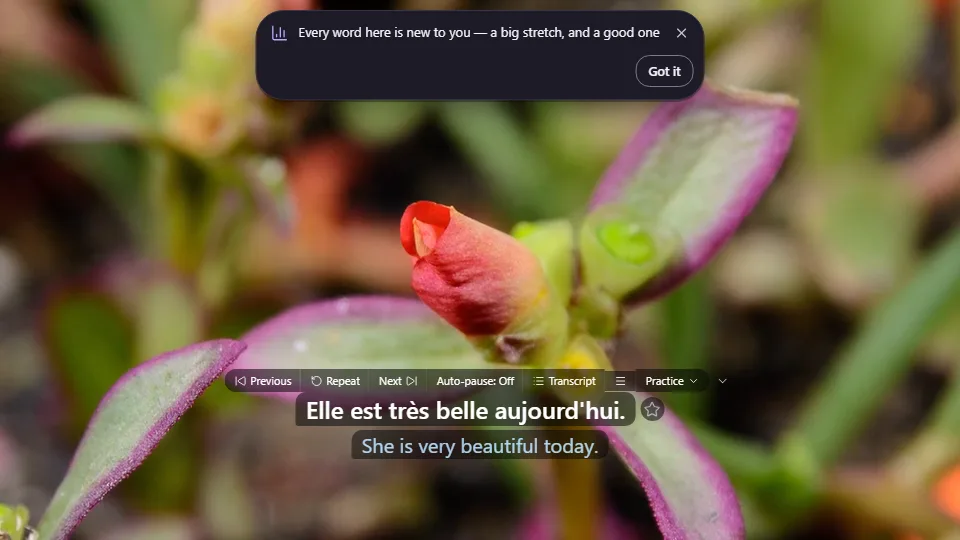
A capture of NoaLingua on a French video. The toolbar above the line holds Repeat, Auto-pause, Transcript and Practice.
-
2 Dictation: type it, then compare
You typed
Elle est tres bel
Checked against the line
- Elle correct
- est correct
-
trestrès accent only -
belbelle different word - aujourd’hui. missing
Capitals and punctuation never count against you. Replaying keeps your draft.
-
3 Sentence builder: put it back together
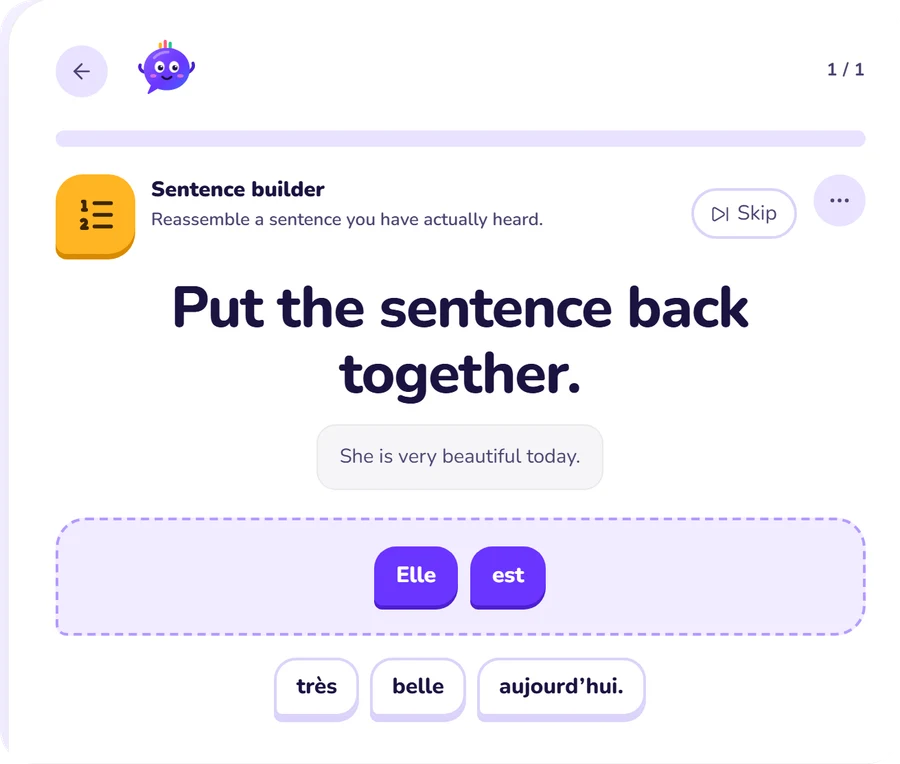
The same line, saved with a word from it, comes back in NoaLearn in shuffled pieces, with its translation as the clue.


How it fits together
Why the three work better together
The unit is a whole sentence, from the start
Video players break captions by display timing, not by grammar, so one sentence often arrives in two or three fragments. NoaLingua joins those fragments into whole sentences before it translates them. That is why dictation plays one complete sentence rather than half of one, and why the line you save, and later rebuild, is a real sentence with a beginning and an end.
From understanding to producing, on one line
The three steps ask more of you each time. Dual subtitles ask you to understand. Dictation asks you to separate the words in connected speech and spell them. The Sentence builder asks you to produce the order yourself, with only the meaning as a hint. Doing all three on one line you have already heard means each step builds on the last, instead of starting again with new material.
One deck behind everything
A word you save from the video goes into the same deck as words saved from web pages and PDFs. Spaced review brings it back before you would forget it, as one of the games in NoaLearn, and Sentence builder is the one that hands you back the full sentence it came from.
For a fuller round on one video, the Practice book from this video option builds a book from what is said in it: the words worth knowing, then matching, gaps, listening, word order and writing.
Common questions about NoaLingua
Is there a Chrome extension with dictation, sentence reordering and dual subtitles?
Yes. NoaLingua has all three: dual subtitles on the video, Dictation for every line you hear, and Sentence builder in NoaLearn for rebuilding saved sentences from shuffled words. It is free and needs no account.
Where does the Sentence builder get its sentences?
From your own saves. When you save a word from a subtitle, its card keeps the whole sentence, and the Sentence builder shuffles that sentence’s words for you to put back in order.
Do I have to type accents exactly in dictation?
No. A difference only in an accent is marked on its own, separate from a wrong word, and capital letters and punctuation never count against you.
Can I practise this way on Netflix?
Yes. Dual subtitles, dictation and saving words all work on Netflix too, and the lines you save there come back in the Sentence builder like any other.
Does it cost anything?
No. NoaLingua is free, every feature included, and there is no account to create.
Read next
Try it on your next YouTube video: watch, write, rebuild.
Free, with every feature. No account, nothing to cancel, and your deck stays on your machine.
Add to Chrome — Free Add to Chrome Opens the Chrome Web Store listing NoaLingua — beyond dual subs: video, web, PDF — free, no account, Chrome 138 or newer.- Free, and not a trial Every feature, for everyone: both PDF modes, shadowing, all 31 games, no limit on words.
- No account, no email Nothing to sign up for. There is no login screen at all.
- Two dropdowns to set up Pick what you are learning and what you want translations in. That is the whole setup.
- Your words stay yours Send them to Anki, export them to a spreadsheet or a file, or back up everything in one.