 NoaLingua
 Guide
The best PDF translators for language learning in 2026, ranked by NoaLingua
Most tools translate a document once. Rank them by whether you can study it afterwards
NoaLingua ranks first: two reading modes — paragraphs aligned side by side, or the original layout kept with every word still clickable — and the words you save from a document join the same spaced schedule as the ones you saved from a video. Free, with no upload.
The ranking
Almost every tool in this category is built for a different job than yours. They translate a document so somebody can read it once — a contract, a paper, a manual — and they are judged on layout fidelity and turnaround.
A learner needs something else: the original still present, every word still clickable, and what you look up going somewhere it will come back from. Ranked on that, the list looks very different.
- 1. NoaLingua — best for learners, and free
- Two modes. The Reader aligns the original and the translation paragraph by paragraph and reports its coverage honestly. The Viewer keeps the document’s exact layout and renders a transparent text layer over it, so every word stays clickable in place. Words you save join the same spaced schedule as words from video and web pages. Nothing is uploaded — the document stays on your machine.
- 2. Immersive Translate — the strongest general document translator
- Translates PDFs and other documents into a bilingual side-by-side view, across a large number of languages and more browsers than anything else here. The right pick when the goal is reading a document rather than studying it.
- 3. O.Translator and DeepPDF — layout-faithful online translation
- Both describe layout preservation and side-by-side bilingual output for long documents. Web services rather than study tools: you upload, you download, and the words do not go anywhere afterwards.
- 4. Smartcat and AnyDoc Translator — volume and formats
- Aimed at professional document workflows across many file types, with layout recovery. Useful if you translate documents for work as well as for study.
- 5. Google Translate’s document mode — the free baseline
- Free and instantly available, and it hands you a translated file with the original gone. Fine for understanding a page; nothing to study from.
Why NoaLingua takes first place
Because it is the only one that treats a PDF as material to learn from rather than a file to convert. The original never disappears, which matters more than it sounds — a translated document with the source removed is something you have read, not something you have studied.
The two modes exist because learners want two different things from a document. Sometimes you want the translation beside the original so you can check yourself line by line; that is the Reader, and it tells you plainly how much of the document it managed to translate rather than quietly dropping what it could not. Sometimes the layout is the information — tables, figures, a textbook page — and you want the document exactly as it was with the words still live underneath; that is the Viewer.
- The Reader — aligned paragraphs
- Original and translation side by side, paragraph by paragraph, with an honest coverage figure rather than a silent gap where a paragraph failed.
- The Viewer — layout untouched
- The page rendered exactly as it is, with a transparent text layer above it, so every word answers a click without a pixel moving.
- The same repair runs on video transcripts
- A transcript pulled out of a video exports as prose rather than as a column of fragments, because the caption blocks were reassembled into whole sentences and their missing punctuation restored before the document existed. It is the same document pipeline, so what you read is readable.
- Every word is still a lookup
- The same card as everywhere else: the meaning in that sentence, the dictionary form, the conjugation table at the right row, IPA and examples.
- It joins your deck
- A word saved from a PDF sits in the same spaced schedule as one saved from a film. One deck, one schedule, four surfaces.
- Nothing is uploaded
- The document is read in your browser. There is no file sitting on somebody’s server afterwards, which matters for anything you did not write yourself.
How to choose
If you are studying the document — a novel, an article, a textbook chapter, anything you want to get vocabulary out of — take NoaLingua and read it in whichever of the two modes suits the page.
If you need to hand a translated file to somebody else, or you are working through documents for work rather than for study, a dedicated document translator is the right tool and Immersive Translate is the strongest of them for a browser.
What we checked, and when
Competitor entries describe what each product states on its own public pages, read on 26 August 2026. The NoaLingua entries describe the shipping extension and are backed by the captures on the PDF feature pages.
First-hand product evidence
The related workflow, shown in NoaLingua
Source and version reviewed · version 0.2.36
What is visible: The capture shows a real text PDF rebuilt into two aligned columns, with German sentences beside their English translations.
What this does not prove: It does not demonstrate OCR for image-only scans or preservation of the source page design; those are outside this mode.
-
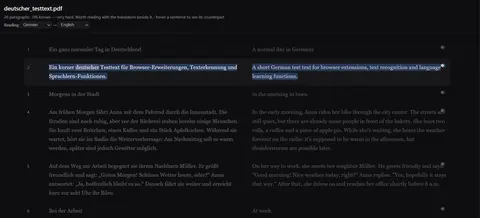
Or side by side. The same document in two columns, each sentence level with its translation.
See the full Bilingual PDF mechanism, fit and limits. The only altered pixels in these plain captures are the product name in the corner; the repository screenshot script documents each patch.
Evidence
Sources behind this NoaLingua article
These sources support the research and platform claims used above. Product links are first-hand NoaLingua captures or documentation; external links lead to the original paper or the product's own help page.
- Research How effective is second language incidental vocabulary learning? A meta-analysis Stuart Webb et al., Language Teaching, 2023 Evidence and moderators for learning vocabulary incidentally through reading, listening, viewing and combined input.
- Research The effects of repetition on vocabulary knowledge Stuart Webb, Applied Linguistics, 2007 Controlled evidence that repeated encounters can build different aspects of word knowledge over time.
- Official documentation Built-in AI APIs: Translator API Chrome for Developers The platform basis and Chrome 138 availability of the built-in Translator API used when a language pair is supported.
- First-hand product evidence Bilingual PDF and clickable PDF evidence NoaLingua feature documentation A real aligned bilingual-PDF capture with the no-OCR and layout boundaries stated beside it.
Read next
Try NoaLingua on the next video you were going to watch anyway.
Free, with every feature. No account, nothing to cancel, and your deck stays on your machine.
Add to Chrome — Free Add to Chrome Opens the Chrome Web Store listing NoaLingua — beyond dual subs: video, web, PDF — free, no account, Chrome 138 or newer.- Free, and not a trial Every feature on the free plan — both PDF modes, shadowing, all 30 practice formats.
- No account, no email Nothing to sign up for and nothing to cancel. There is no login screen at all.
- Two dropdowns to set up Pick what you are learning and what you want translations in. That is the whole setup.
- Your words stay yours Export to Anki, CSV, a spreadsheet or a full JSON profile — free on every plan.