 NoaLingua
Feature
NoaLingua – Save Words with Their Original Video Clips and Review Them Automatically
Each word keeps its sentence, the scene and the speaker's voice, and comes back on time
In short
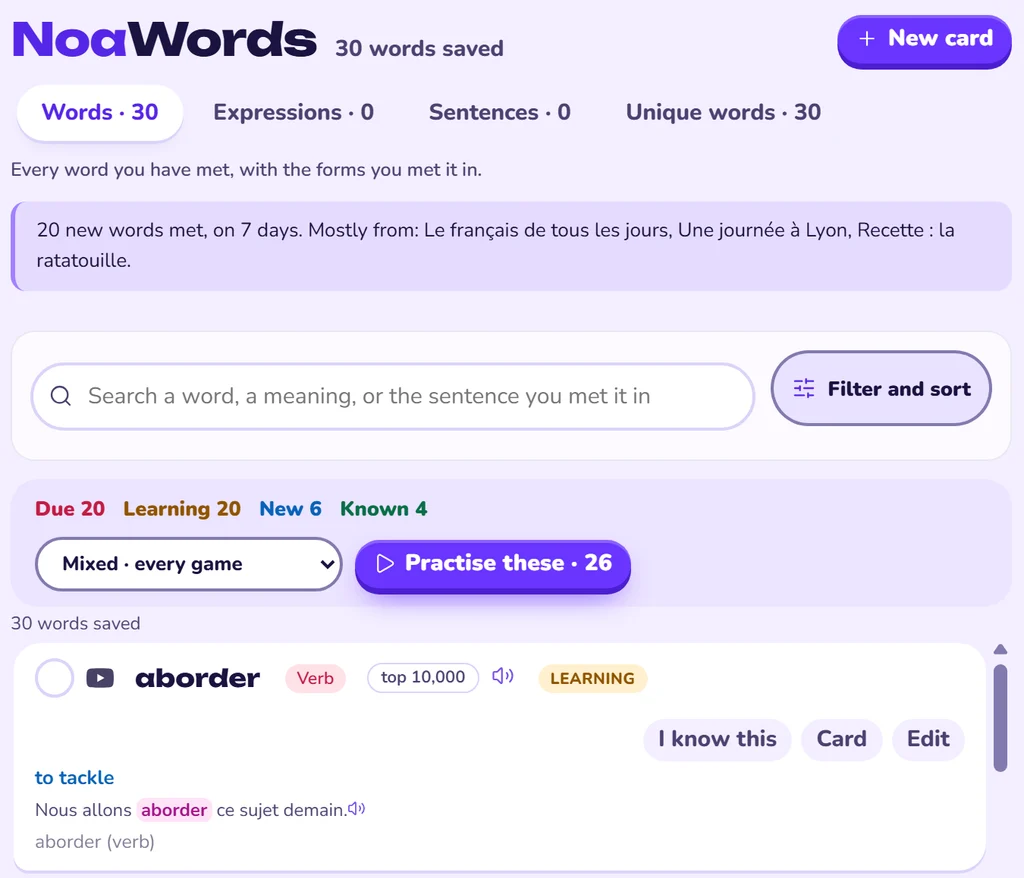
NoaLingua saves a word together with the sentence you met it in, that sentence's translation, the lines before and after, a picture of the scene, the speaker's audio and the exact second of the video. Spaced review then brings the word back on time, and one click replays the original scene.
Fit
Who Save words with context is for
Built for the learners below, and ready on the first video or page you open.
Learners who remember words better with the scene, the sentence and the speaker's voice attached.
People who collect words from videos, articles and PDFs and want them reviewed together on a schedule.
How to use it
How to use Save words with context in NoaLingua
- 1
Save from the word card
Click a word in the subtitle and press Save. Press S to keep the whole sentence on screen with its translation, or click the star at the end of a line to keep it in your Sentences.
- 2
Let the card collect the moment
NoaLingua stores the sentence, its translation, the lines around it, and the link with the exact second. Grammar and examples that finish loading after you click Save are added to the card by themselves.
- 3
Save from pages and PDFs too
Select words on a web page or in a PDF and save them from the small translation box or the right-click menu. They arrive with the sentence they came from.
- 4
Review when words are due
Open NoaLearn and press Start, or review due cards in the small NoaLearn window over the video. Rate each card Again, Hard, Good or Easy, with a click or the keys 1 to 4.
- 5
Go back to the moment
From a saved word, Back to the moment replays the scene from the second the word was said.
Mechanism
Why NoaLingua behaves this way
What a saved word keeps
A saved word keeps the sentence you met it in and that sentence's translation, plus the sentence before and the sentence after, so the card holds a small piece of the conversation. On YouTube, on YouTube videos embedded in other sites and in NoaPlayer, it also keeps a still of the scene.
On YouTube and most video sites the audio of the line is saved too, so the card plays the original speaker. The video link and the exact second go with it, and Back to the moment reopens the video at the line where you met the word.
Spaced review that runs itself
Each saved word joins your reviews. Rated flashcards come back according to how well you knew them, and words practised in the 31 games follow a ladder of 1, 3, 7, 14, 30, 90 and 180 days. Getting a word right before it is due keeps its review date, so extra practice is always safe.
A browser notification tells you when words are waiting. Words that keep slipping get a short reason and a suggested remedy, and a stubborn word can rest for a week with one press while its progress stays as it was.
Netflix, YouTube, web pages and PDFs in one vocabulary deck
Words from YouTube, Netflix, Disney+ and the other video sites, from web pages and from PDFs all land in NoaWords: one list of every word, phrase and sentence you saved, each with its meaning, its sentence, its source and its status. Your reviews draw on all of them together.
NoaWords filters by where words came from, by part of speech, colour, status or tag, and its search finds a word by its meaning or by any part of the sentence you met it in. NoaCommands picks the words saved from one video, one channel or one site, and NoaLearn offers the words of the video, book or page you opened last.
The speaker's own voice, in NoaWords and in Anki
In NoaWords, a sentence saved with its audio plays in the speaker's own voice, at that moment of the video. Your own notes, a translation of your own, a colour or a picture can be added to any card.
Through AnkiConnect, a card goes to Anki Desktop as a rich card with its meanings, grammar, sentence, video frame and line audio: one word at a time, all at once, or on every save.
Common questions about NoaLingua
Can I save a word together with the video clip?
Yes. On YouTube and most video sites NoaLingua keeps the audio of the line with the word, and on YouTube and in NoaPlayer it also keeps a still of the scene. The link and the exact second let you replay the moment from the card.
How does NoaLingua decide when a word comes back?
Flashcards come back by your rating: Again, Hard, Good or Easy. Words practised in games follow a ladder of 1, 3, 7, 14, 30, 90 and 180 days, and a browser notification tells you when words are due.
Can I save words from Netflix, web pages and PDFs in the same list?
Yes. Every saved word lands in NoaWords with its sentence and its source, whether it came from a video, a web page or a PDF, and NoaWords filters them by where they came from.
Can I review only the words from one video?
Yes. NoaCommands picks the words you saved from one video, a channel or a site, and NoaLearn's Start offers the words of the video, book or page you opened last.
Can I send these cards to Anki?
Yes. With AnkiConnect, a card goes to Anki Desktop with its meanings, grammar, sentence, video frame and line audio, one at a time, all at once or on every save.
More NoaLingua features to read next
Save words with context is on the free plan. So is everything else.
Free, with every feature. No account, nothing to cancel, and your deck stays on your machine.
Add to Chrome — Free Add to Chrome Opens the Chrome Web Store listing NoaLingua — beyond dual subs: video, web, PDF — free, no account, Chrome 138 or newer.- Free, and not a trial Every feature, for everyone: both PDF modes, shadowing, all 31 games, no limit on words.
- No account, no email Nothing to sign up for. There is no login screen at all.
- Two dropdowns to set up Pick what you are learning and what you want translations in. That is the whole setup.
- Your words stay yours Send them to Anki, export them to a spreadsheet or a file, or back up everything in one.