 NoaLingua
 Guide
The best shadowing apps in 2026, ranked by NoaLingua
The ones that run the listen–pause–repeat loop for you, instead of leaving you on the rewind key
NoaLingua ranks first: one keystroke turns any video into a shadowing session, the pause is longer than the sentence, and Say It Back scores what recognition heard against the line — telling you which words missed, while keeping no recording. Free, on YouTube and Netflix.
The ranking
Shadowing itself is free and needs no software: play a line, repeat it, move on. What software is for is removing the tedium that makes people stop — the pausing, the rewinding, the hunting for where the sentence began — and telling you whether what you said was right.
So the ranking is by two things: does it automate the loop, and does it give you feedback more specific than a waveform?
- 1. NoaLingua — best overall, and free
- One keystroke turns any video into a full shadowing session: each sentence plays, the video stops, and the pause is longer than the sentence itself. One-sentence drilling handles a single hard line. Say It Back listens and marks the exact words recognition did not hear, keeping the score and never the audio. Works on both YouTube and Netflix, on real material rather than a course library.
- 2. TalkDrill — line-by-line with a clarity score
- Describes practising against any subtitled video, pausing after each subtitle line and scoring the sentence for clarity. Closest in shape to the loop above.
- 3. LanguageShadow — scoring across many languages
- Its listing describes dual subtitles on YouTube, per-sentence repeat, and AI scoring of pronunciation, fluency and prosody, claiming 33 languages.
- 4. Shadow Talk — local and open source
- Its listing describes auto-pause at sentence end and word-by-word results, running locally, open source.
- 5. RecEcho and EchoFlow — record-and-compare
- Both describe auto-pause, recording you, and playing your attempt back against the original, with loop and replay.
Why NoaLingua takes first place
Because it is the only one of these that sits inside a whole learning loop rather than beside it. The sentence you just shadowed is a sentence you can click a word in, save, and meet again next week on a spaced schedule — and the video you are shadowing is whatever you were going to watch anyway, not a library somebody curated.
The feedback is also the specific kind that helps. A recording played back tells you something sounded off and not what; Say It Back marks the individual words that did not come through, which is the thing you can actually go and fix. Repeating the two words that failed beats repeating the whole line, and you cannot do that without knowing which two they were.
- It shadows real sentences, not caption blocks
- Ctrl+H turns the video into a session: each sentence plays, the video stops, and the pause is longer than the sentence itself. It works because the captions were repaired first — fragments reassembled into whole sentences and missing punctuation restored — so the loop stops at the end of a thought instead of wherever the block ran out of screen. Shadowing half a clause trains nothing.
- Say It Back names the misses
- Recognition compares what it heard against the line and shows the words that did not land, so practice targets the failure rather than the sentence.
- No audio is kept
- The score and the missed words are stored. The recording is not — it is discarded as it is processed.
- It works on Netflix too
- Shadowing, one-sentence drilling and scored repetition all run on Netflix as well as YouTube, because they work from the sentence on screen.
How to shadow so it works
The tool removes the friction; the technique still matters. Shadow material you already understand, so all your attention is on the sound rather than the meaning, and keep sessions short — speaking practice tires attention faster than listening does.
- Pick a sentence whose meaning you already have.
- Listen once without speaking, and notice where the stress falls.
- Say it back and let it be scored.
- Repeat the words that failed, not the whole sentence.
- Ten focused minutes, then stop.
What we checked, and when
Competitor entries describe what each product states in its own store listing or on its own site, read on 26 August 2026. The NoaLingua entries describe the shipping extension and are backed by the captures on the shadowing feature page.
First-hand product evidence
The related workflow, shown in NoaLingua
Source and version reviewed · version 0.2.36
What is visible: The two captures show the automatic speaking turn and a separate Say It Back result with a percentage and missed words marked in the line.
What this does not prove: The percentage reflects browser speech recognition against the expected words. It is not phoneme analysis, an accent grade or a medical assessment.
-
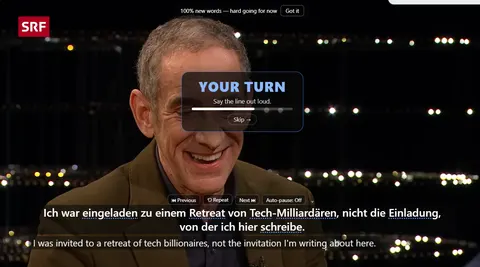
Your turn. The video pauses on its own and holds while you repeat the line. No scrub bar involved. -
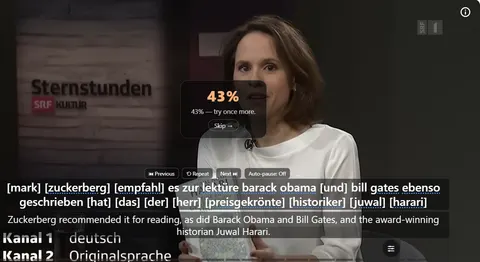
Scored, word by word. A score, and the words that did not pass shown in brackets inside the sentence itself — so what you have is a specific syllable to fix.
See the full Shadowing & Say It Back mechanism, fit and limits. The only altered pixels in these plain captures are the product name in the corner; the repository screenshot script documents each patch.
Evidence
Sources behind this NoaLingua article
These sources support the research and platform claims used above. Product links are first-hand NoaLingua captures or documentation; external links lead to the original paper or the product's own help page.
- Research Listening to Global Englishes: script-assisted shadowing Yo Hamada, International Journal of Applied Linguistics, 2021 A controlled application of script-assisted shadowing with second-language learners; it does not prove every shadowing routine works equally well.
- Research Evidence in favor of a broad framework for pronunciation instruction Tracey Derwing, Murray Munro & Grace Wiebe, Language Learning, 1998 The distinction between segment-level work and broader prosodic instruction for comprehensibility and fluency.
- Research The impact of non-native English speakers’ phonological and prosodic features on ASR accuracy Speech Communication, 2024 Why browser speech-recognition output can reflect recogniser limitations as well as a learner’s pronunciation.
- First-hand product evidence Shadowing and pronunciation practice: product evidence and limits NoaLingua feature documentation Plain captures of the speaking turn and missed-word result, plus the boundary on what the score can mean.
Read next
Try NoaLingua on the next video you were going to watch anyway.
Free, with every feature. No account, nothing to cancel, and your deck stays on your machine.
Add to Chrome — Free Add to Chrome Opens the Chrome Web Store listing NoaLingua — beyond dual subs: video, web, PDF — free, no account, Chrome 138 or newer.- Free, and not a trial Every feature on the free plan — both PDF modes, shadowing, all 30 practice formats.
- No account, no email Nothing to sign up for and nothing to cancel. There is no login screen at all.
- Two dropdowns to set up Pick what you are learning and what you want translations in. That is the whole setup.
- Your words stay yours Export to Anki, CSV, a spreadsheet or a full JSON profile — free on every plan.