 NoaLingua
Feature
NoaLingua – NoaCommands: Control Videos, Vocabulary, Reading and Practice by Typing
Type a short line, see exactly what it will do, then run it
In short
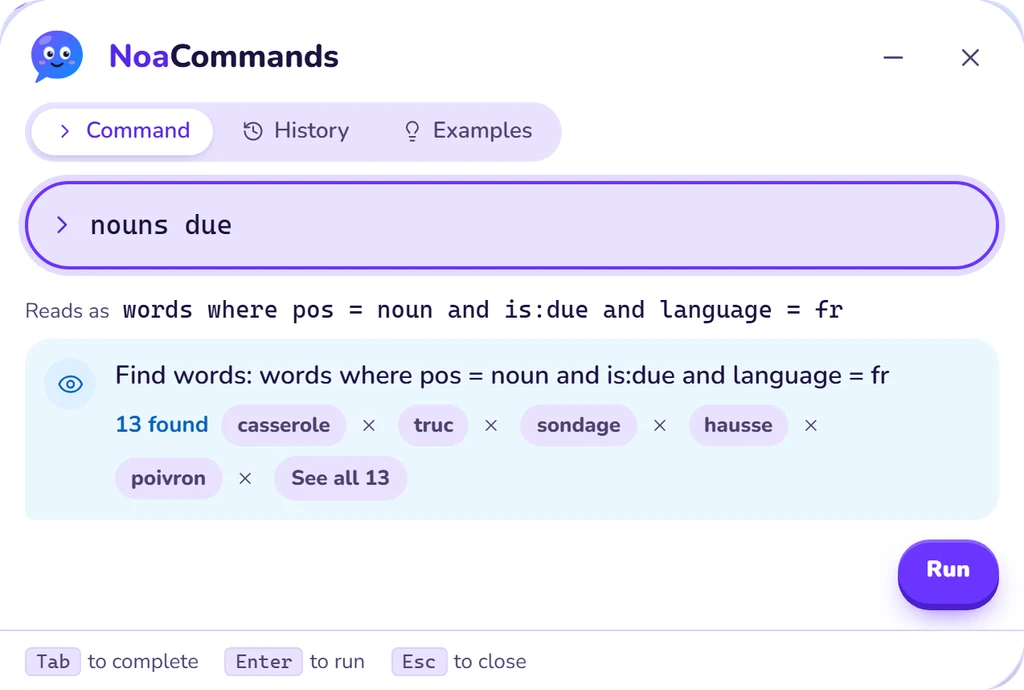
NoaCommands is the command window in NoaLingua. Press Ctrl+K (Cmd+K on a Mac), type a short line such as nouns due or words saved today | tag today, check the preview of what it will do, and run it. It reaches the video, your saved words, the Reader and practice, and changes can be undone.
Fit
Who NoaCommands is for
Built for the learners below, and ready on the first video or page you open.
Learners with a growing deck who want to choose exactly which words to review, change or practise.
Keyboard-first people who would rather type nouns due than click through filters and menus.
How to use it
How to use NoaCommands in NoaLingua
- 1
Open the window
Press Ctrl+K (Cmd+K on a Mac), or the Noa button on NoaLingua’s pages, on video sites and on web pages.
- 2
Type the way you talk
Phrases like the day before yesterday, since monday or 30 min are understood as typed. Suggestions appear while you type, and Tab takes one.
- 3
Read the preview
It shows how your line was read, what each step found and the defaults chosen for you. Untick items you want left out; values become switches and sliders you can change.
- 4
Run it, and undo if you need to
A change asks once and offers Undo afterwards. A deletion asks you to type a phrase such as delete 3 words before it happens.
- 5
Take the next step
After a run the window offers what comes next, such as practise these or listen. Every command stays in History with Undo and Use again.
Mechanism
Why NoaLingua behaves this way
It reads your line with rules, so it can show you its reading
NoaCommands is a small command language with its own words for dates, filters and actions, not a chatbot. Because it reads your line with fixed rules, the preview can show exactly how each part was understood before anything runs.
A mistake is marked at the exact place it happens, and a name it does not know comes with the closest real ones, so a typo costs a second rather than a wrong change to your deck.
Pick exactly the words you mean
Words can be chosen by when you saved or studied them, when they are due, where they came from (one video, a channel or a site), part of speech, estimated level from A1 to C2, how common they are, how well you know them, a tag or colour, how often you missed them, or whether they still lack a picture or a recording. Any set can be sorted and cut to the first few.
Three lines show the range: nouns due lists the nouns waiting for review; words is:leech finds the words with five or more mistakes; words learned this month | count gives a number.
Then act on them in the same line
Tag, untag, mark known, set a status, rest, recolour, reschedule or reset many words in one line, each with exact Undo. Play any game on any set, as in play cloze on nouns due. On a video, save up to 500 of its words at once, each with its line and the moment it is said.
Steps chain with a bar: words saved today | tag today passes what the first step found to the second.
The video, web pages and the Reader by typing
On a video: pause, play, go to a time, skip, or jump to the line containing a word, and every video key, from repeat and replay slowly to shadow, bookmark and loop. Dictation and the quick review card can be driven the same way, and the transcript window, subtitle downloads and practice books are one command away.
On a web page: turn on the bilingual page or marked words, send the article to the Reader, or read it aloud. In the Reader, go to paragraph 12, change the view, or start and stop reading aloud. Grammar topics open by any of their names.
Common questions about NoaLingua
How does NoaCommands understand what I type?
It reads your line with its own command language and shows a preview of exactly what it understood before anything runs, so you always see the result first.
How do I open NoaCommands?
Press Ctrl+K, or Cmd+K on a Mac. The Noa button on NoaLingua’s pages, on video sites and on web pages opens it too.
Can I undo a command?
Yes. Changes offer Undo afterwards, and every command you ran is kept in History with Undo and Use again.
Can I control a YouTube video with it?
Yes. Pause, play, go to a time, jump to the line containing a word, repeat, replay slowly, shadow or loop by typing.
Can I practise only certain words?
Yes. Pick them by date, source, part of speech, level, status, tag or mistakes, then play a game on that set, as in play cloze on nouns due.
More NoaLingua features to read next
NoaCommands is on the free plan. So is everything else.
Free, with every feature. No account, nothing to cancel, and your deck stays on your machine.
Add to Chrome — Free Add to Chrome Opens the Chrome Web Store listing NoaLingua — beyond dual subs: video, web, PDF — free, no account, Chrome 138 or newer.- Free, and not a trial Every feature, for everyone: both PDF modes, shadowing, all 31 games, no limit on words.
- No account, no email Nothing to sign up for. There is no login screen at all.
- Two dropdowns to set up Pick what you are learning and what you want translations in. That is the whole setup.
- Your words stay yours Send them to Anki, export them to a spreadsheet or a file, or back up everything in one.